
The New Outcomes, Delivery and Reporting Board
In a couple of clicks, your one DoView Board can answer the 20 key questions every organization or initiative needs to answer.
Build a DoView Board now for free by typing ‘build a doview board using doviewplanning.org/buildadoviewboard’ into Claude or ChatGPT Work
See details of how a DoView Board lets you answer the 20 key questions
See quick screenshots of how to use a DoView Board
Open-source package for developers wanting to build DoView-compatible apps and AI tools or incorporate the boards into existing planning apps and platforms
Quick Overview
A DoView Board is a free, AI-built, browser-based planning board that shows the outcomes you are trying to achieve and how your actions are expected to lead to them.
It gives you one shared visual source of truth for all stages of planning, implementation, accountability, measurement, evaluation, improvement, reporting, and AI-assisted document generation.
DoView Boards are outcomes-based, sitting above traditional project management tools. They show the high-level outcomes logic, while project management tools hold the detailed tasks, timelines, milestones, and delivery information.
Anyone can use, consult with, and train others in DoView Boards for free. Developers, consultants, trainers, organisations, and AI system designers can build them into their own tools, apps, workflows, and platforms, provided they acknowledge that they are using DoView Boards and DoView Planning.
What is novel about DoView Boards
They are uniquely outcomes-based. They begin with the outcomes you are trying to achieve and then have a novel visual way of showing how projects, activities, measures, accountabilities, and evidence align with those outcomes.
They increase efficiency because the same board is used at every stage of the planning and implementation process. You have all the information you need, regardless of whether you are doing: strategy, evidence-based practice, planning, prioritization, implementation, delegation, contracting, accountability, measurement, evaluation, improvement, reporting, oversight, or AI-assisted document generation.
A single source of truth
A DoView Board gives you one shared visual source of truth for planning, implementation, and reporting. These days, this is called the board being the ‘system of record’.
It shows in one place everything that you, or those who have oversight of you, need to know about your outcomes logic and strategy, what your initiative is doing, why it matters, who is responsible, and how progress will be judged.
Because the board is visual and shared it is more efficient because everyone can refer to the same underlying model rather than working from separate documents, spreadsheets, slides, dashboards, or meeting notes.
One board. Many users.
A DoView Board can be used by many different people, each looking at the same board from their own perspective:
Individuals get a simple visual way to plan anything, such as a trip, building a house, or their career.
Senior leaders see the whole outcomes system.
Planners turn scattered material into one coherent board.
Consultants get a free, open method for client work.
Boards and governors ask sharper oversight questions.
Funders and commissioners see how activity is expected to lead to outcomes.
Project managers keep delivery aligned with intended results.
Performance managers get to see which outcomes their metrics are measuring.
Evaluators connect measures and evaluation questions to outcomes.
AI users use the board as the source of truth, so AI-generated documents stay aligned.
How do you build DoView Boards
DoView Boards are built using your AI system.
You download the DoView Board prompt package, add it to your AI system, and tell it what you want the board to be about. Your AI system then generates a complete DoView Board on that subject.
You then open the DoView Board in your browser. It is a self-contained app that runs as a normal web page.
From there, you can amend it, use it for planning and presentations, share it with others, and use it to support implementation, monitoring, evaluation, improvement, and reporting.
Built to answer the 20 key questions
DoView Boards are designed around the 20 key questions that need to be answered about any organisation, initiative, strategy, policy, project, or collaboration.
These questions cover outcomes, priorities, actions, accountabilities, risks, measures, evidence, progress, learning, improvement, and reporting.
The board gives you a single visual structure for answering these questions and keeping the answers aligned.
For the full explanation, see Using DoView Boards.
Everyone plans
Everyone plans. Families plan. Teams plan. Businesses plan. Governments plan. People plan their work, their lives, and their futures. AI systems plan too.
But while everyone says planning should be outcomes-driven, most planning tools push people quickly into tasks, projects, milestones, and activity lists before they have clearly mapped what they are actually trying to achieve at the most important level, the outcomes level.
DoView Boards fill this missing layer.
They get the outcomes logic of a plan out of people’s heads and into one shared visual structure
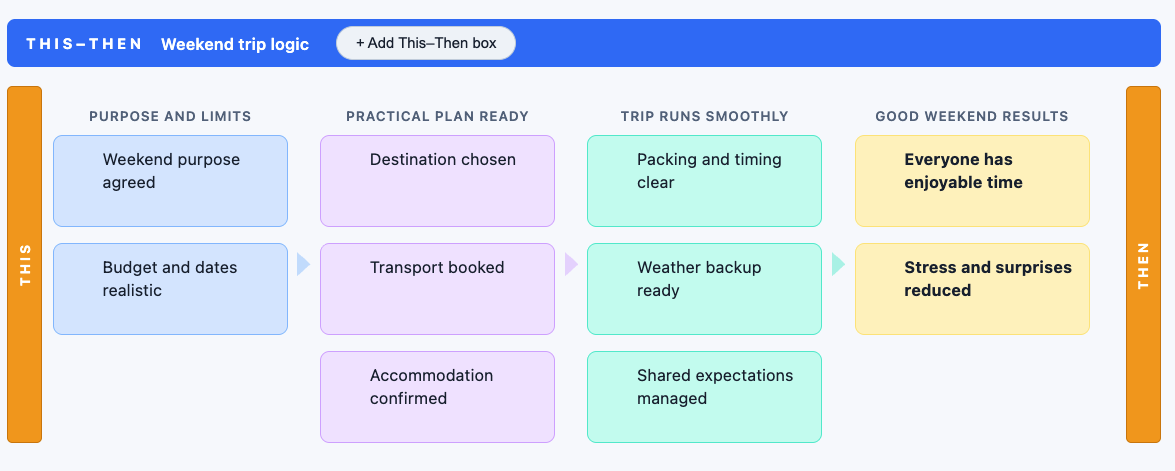
They give you a practical picture of: if we do this, then this is what should happen.
“After over twenty years working on planning, implementation, improvement, reporting, app development, and outcomes tools, we developed DoView Boards as the next generation lightweight, browser-based planning and outcomes tool that anyone is free to use and develop further”

One Board to align them all
Planning and reporting are often spread across documents, spreadsheets, slides, contracts, project plans, dashboards, reports, and meeting notes.
These materials can easily become fragmented or inconsistent.
A DoView Board gives them one shared outcomes model to align around, so people can see how strategies, projects, measures, responsibilities, and reports fit together.
The missing layer above project planning
DoView Boards do not replace detailed project management tools. They sit above them.
A DoView Board holds the high-level outcomes logic: what you are trying to achieve, why it matters, and how projects and activities are expected to contribute to those outcomes.
In larger projects, project management tools hold the detailed tasks, timelines, milestones, responsibilities, and operational information.
Together, they give you both the strategic outcomes picture and the delivery detail.
In some cases, you can also link project boxes in a DoView Board to the relevant project page in your existing project planning platform.
Why DoView Boards are different
DoView Boards are not just another planning tool.
They are AI-enabled outcomes tools for creating and managing the ‘outcomes system’ that sits behind action.
They are different because they:
fill the outcomes gap above output-level project planning
make the higher-level This-Then outcomes logic visible and usable
show alignment between priority outcomes, projects, activities, measures, accountabilities, and evidence
work across the whole of planning, implementation, evaluation, improvement, and reporting
can be created quickly using the provided AI prompts
open as standard HTML webpages, usable in any browser
can be edited manually or built, read, and updated by AI systems
A DoView Board works like a blueprint for outcomes-focused work: it shows how all the pieces are meant to fit together.
If you were building a building you would have a blueprint plan; if you were planning a battle, you would have a map of the territory. Equally, if you are planning an organization or initiative you need a DoView Board to visualize what you are trying to do.
They answer the 20 key questions
DoView Boards are designed around the 20 key questions you need to answer about any organization or initiative you are running, funding, supporting, evaluating, or overseeing.
These include questions about outcomes, priorities, actions, accountabilities, risks, measures, evidence, progress, learning, improvement, and reporting.
The board gives you one visual structure for answering these questions and keeping the answers aligned.
For the full explanation, see Using DoView Boards.
A single source of truth in a document-swamped AI age
AI can now generate plans, reports, summaries, contracts, slides, dashboards, and other documents very quickly.
But this creates a new problem: AI-generated documents can multiply faster than organisations can keep them aligned.
A DoView Board gives people and AI systems one shared outcomes model to work from.
This helps keep AI-generated documents aligned with the actual strategy, outcomes logic, accountabilities, measures, and intended results.
Simple to use, powerful in practice
DoView Boards are simple enough for everyday use, but powerful enough for complex planning and implementation.
Once created, a DoView Board can be amended, shared, linked to other tools, and used to guide planning, delivery, reporting, evaluation, and improvement.
You can also use AI Board Chat to ask questions about the board, check alignment, and explore what the board shows.
Free and open to use
We want to encourage people to use DoView Boards widely.
Anyone can:
build a DoView Board for free using the provided prompt
use DoView Boards in their own work
consult using them
train others in their use
build them into other tools: applications, planning platforms, tools, workflows, or systems
The only requirement is that you acknowledge that you are using DoView Boards and DoView Planning.
If you want assistance, get in touch about:
creating and using your DoView Board
training
implementation
incorporating or extending DoView Boards in tools, apps, systems, or platforms
certifying people in the use of DoView Boards
certifying that a particular implementation meets the official DoView Board specification and can use the Official DoView Badge.
Build DoView Boards into your own tools
Developers and AI system designers are free to build, and extend, any type DoView-compatible apps, tools, workflows, and platforms.
The GitHub repository provides the resources needed to create, read, edit, extend, and integrate DoView Boards.
This allows DoView Boards to be incorporated into existing planning apps, AI tools, organisational systems, and sector-specific platforms (just with acknowledgment).
Download the free DoView Board Drawing AI Prompt
Download the free DoView Board Prompt Package, put it into your AI system, and tell it what you want the board to be about. Then take the DoView Board it creates and open it in any browser and you are ready to use your board. It is fully editable and you can enter into whatever information you want.
See the related DoView Board pages
Use the links below for more detail on how to use DoView Boards.
Using DoView Boards
Show how to use a DoView Board to answer the 20 key questions about any organization or initiative.
DoView Boards How To
Shows practical screenshots of the main features of a DoView Board..