
Whole-of-Government DoView Board Planning
The new visual approach to government planning prioritization, planning, implementation, contracting, improvement, impact & accountability

See. Plan. Do.
Dr Paul Duignan’s presentation (short) to the New Zealand Parliament’s Finance and Expenditure Committee Hearing on Performance Reporting and Public Accountability which summarises the approach to government planning described on this page. Also see here for a detailed discussion of how DoView Planning could be used to support the performance management and reporting changes suggested by the NZ Committee in its report [1].
Quick Overview
Governments are very large organizations working across many sectors at the same time. This makes planning, implementation and reporting difficult. Existing government planning systems are usually a mixture of tradition, convention and statute. A sign that government planning across many governments is still in a state of flux is that incoming administrations often start by changing their government’s existing planning machinery rather than getting up and running and being able to immediately focus on where they want to steer the government. This suggests that there is still no broadly recognized, theoretically robust and widely implemented practical whole-of-government planning system.
DoView Planning, now delivered through DoView Boards, provides a candidate for a better system. It can be used by a government of any political orientation. The purpose of the method is not to determine the direction a government should take. Its purpose is to provide a clearer way of setting out the direction chosen, checking that action is aligned with it, and reporting on progress. And it should be a system that is sufficiently flexible, as DoView Boards are, so that the same overall approach can be used over different administrations.
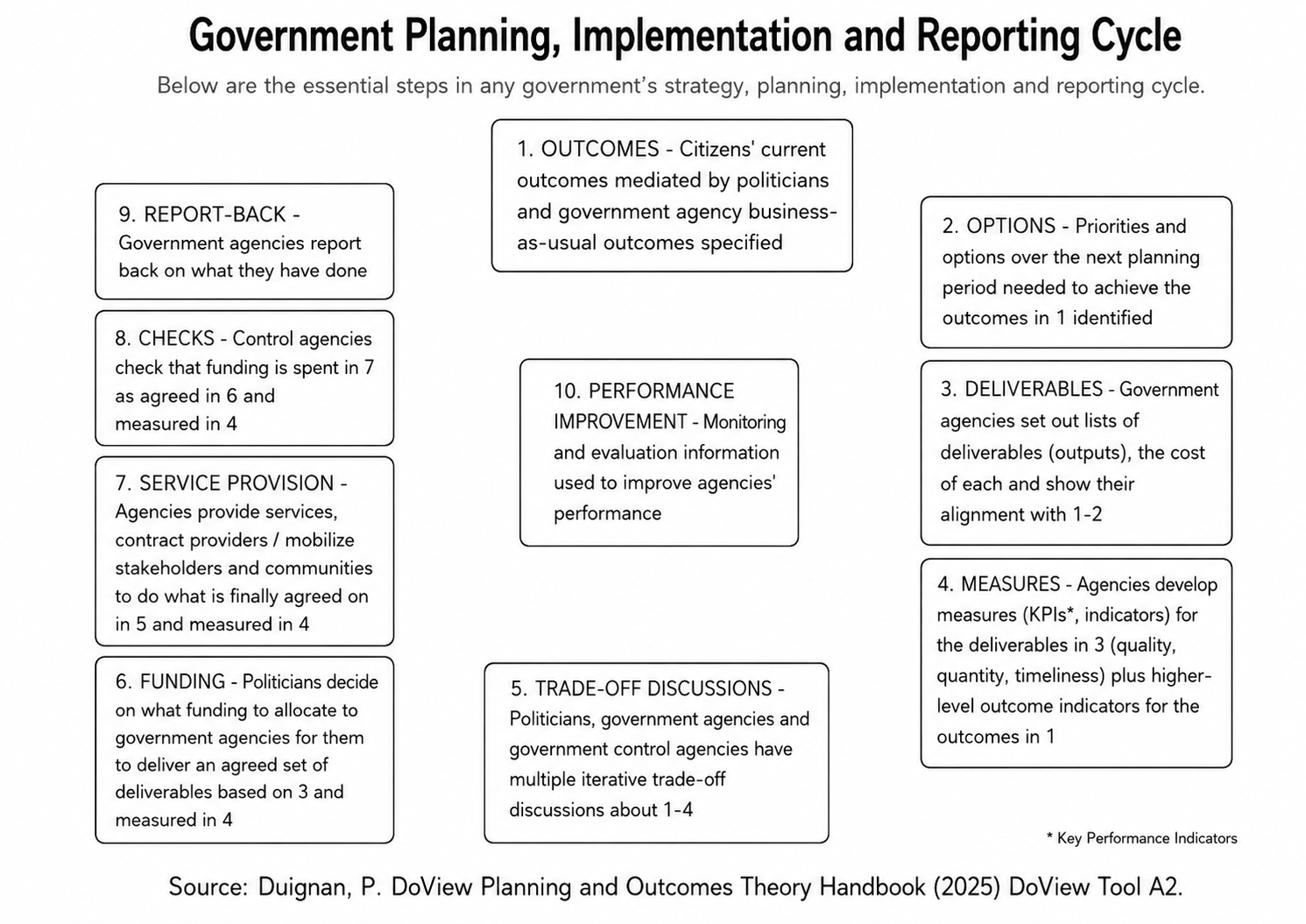
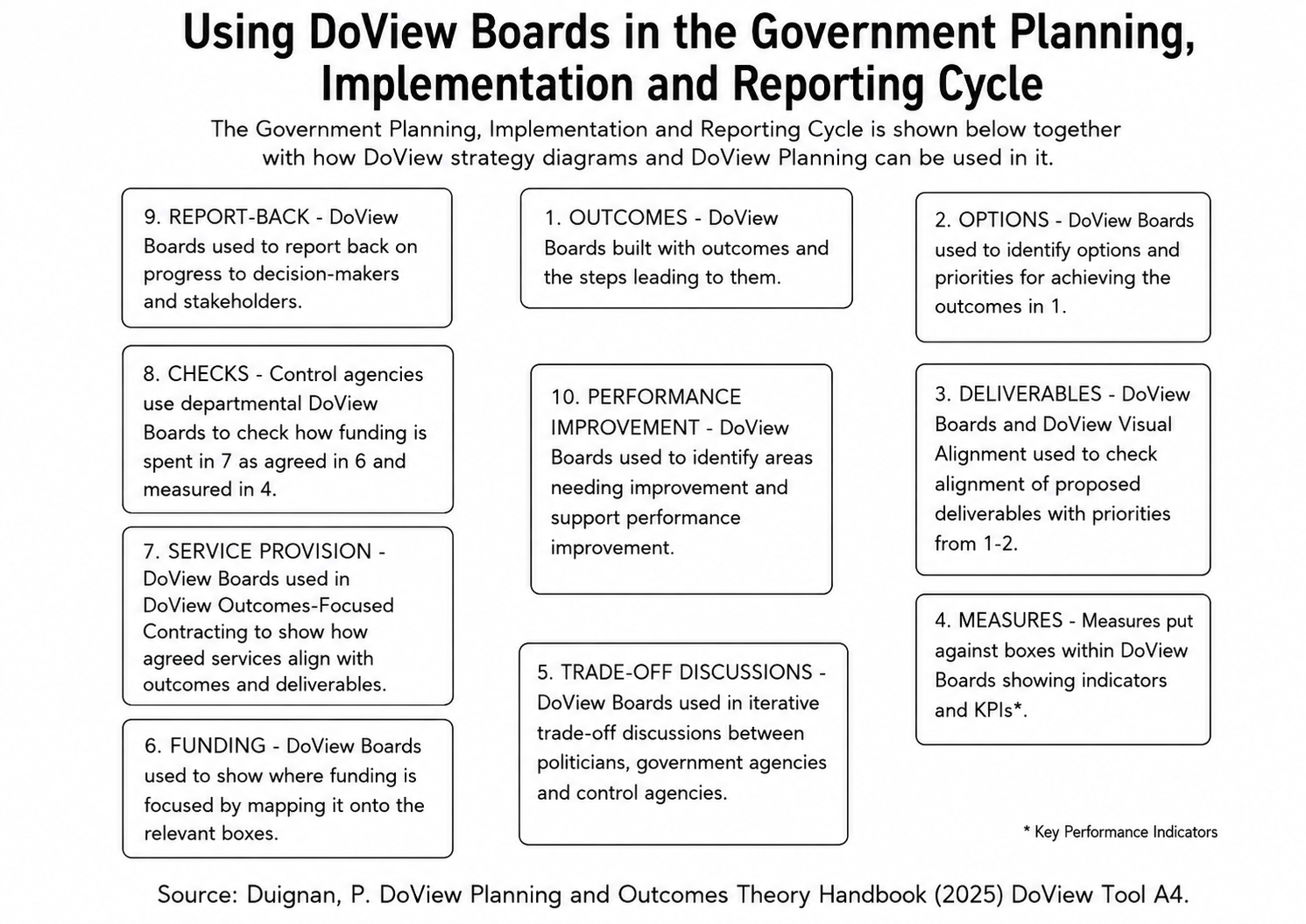
This page sets out the ten steps in a government's planning, implementation and reporting cycle. It then shows how a DoView Board can support each step. For each of the ten steps in the cycle, it lists the relevant questions from the 20 questions DoView Boards answer that are relevant to the particular government planning step. In the relevant sections on these pages you will also find the relevant section of the interactive DoView Board walk-through.
DoView Boards are the latest form of DoView strategy and outcomes diagrams. Earlier forms of DoViews have already been used in hundreds of government initiatives across many sectors.
DoView Boards are open source. Any developer can build them into any app, platform or system (just with acknowledgment). Anyone can use, consult on or train others on the methodology just with acknowledgment. You can draft a board now with the free AI prompt. If you want assistance or training from us get in touch.
If you want us to assist you in using or training regarding DoView Planning and DoView Boards in a government or other context, get in touch.
While this shows how government could use DoView Planning, the same methodology, with some adaptation, could be used for large companies and large international organizations.
Piloting Whole-of-Government DoView Planning
Aspects of DoView Planning have been used in hundreds of government initiatives across many sectors, demonstrating that it can work at lower levels within government agencies. Comprehensive whole-of-government use across a national or regional government would need to take into account the particular government’s statutory requirements, existing practice, staff training, information infrastructure, and institutional change management. This should be done in a staged process:
Use boards on individual initiatives. Departments can start by using DoView Boards on some of their initiatives. This is the fastest way to build familiarity with the method. All the resources needed for government agencies to do this are available on this site. The DoView Handbook covers the planning issues that need to be faced and the free AI prompt can be used to build a draft DoView Board for any government initiative, large or small.
Proof-of-concept Whole-of-Government DoView Board Collection. This would provide a helicopter and drill-down detailed picture of what a government is trying to achieve, structured around its outcomes, priorities and the steps it is using to work towards its outcomes. This would immediately provide a working tool that decision-makers and officials could start experimenting with DoView Boards. Such proof-of-concept DoView Board Collections have been created for the NZ Government, and the frameworks for such collections have also been prepared for NZ Local Government, the UK Government, the US Washington State Government and the Queensland Government in Australia.
Run parts of the method alongside current requirements. Agencies can use parts of the approach within existing planning, funding, contracting and reporting requirements. Encouraging this step would provide further learning about the use of DoView Boards in the context of the particular government’s planning, implementation and reporting system.
Pilot the full ten steps. A full pilot in one or more departments could be used to test feasibility and identify implementation issues.
Implement a wide rollout of DoView Boards and DoView Planning across the government. This would require training, dissemination of suitable guidance and integrating DoView Boards into the government’s IT system (DoView Boards are open source so require no license fee for their incorporation into a government’s system). Anyone can consult on or train others in the use of DoView Boards (just with acknowledgment).
Government Planning, Implementation and Reporting Cycle
How DoView Boards can be used in each of these steps
Building a Whole-of-Government DoView
How you can use DoView Planning and DoView Boards for the ten steps in government planning, implementation and reporting is discussed below. However, as discussed above, in addition to building DoView Boards for individual government agencies, you can build a Whole-of-Government DoView Board Collection consisting of DoView Boards from different agencies, while also including DoView Boards for a government’s high-level outcomes or targets and cross-cutting strategies. This enables one to see a helicopter overview of what the government is trying to achieve and quickly drill down to find details about how it is going about working towards its outcomes within individual departments. Such a collection of boards can provide a concrete tool for moving towards the Outcomes Society.
Below is a live proof-of-concept NZ Whole-of-Government DoView Board Collection.
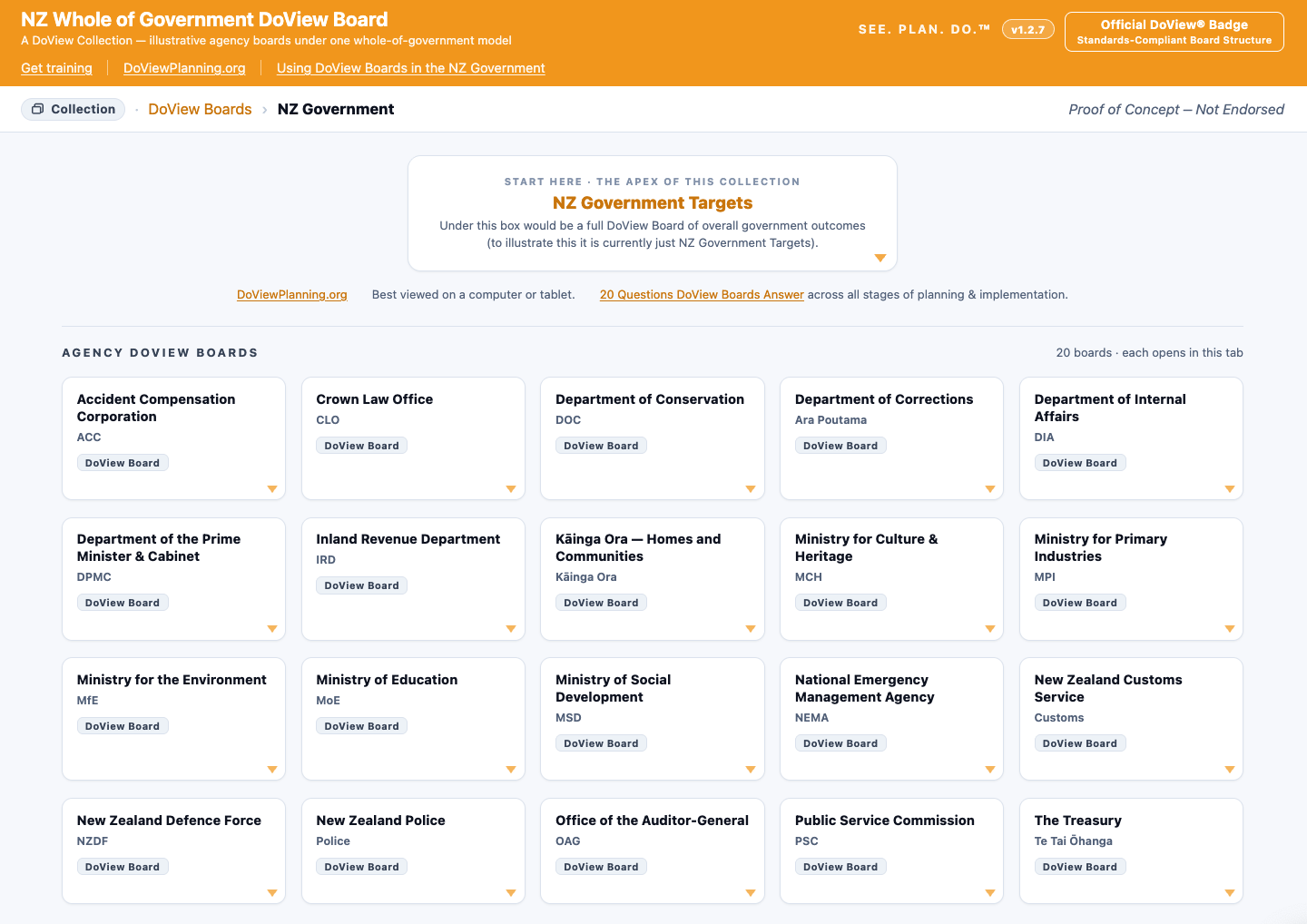
Drilling down into a Whole-of-Government DoView Board Collection

Outcomes - The department creates a DoView Board showing what it is trying to do
The department first sets out the outcomes it is trying to achieve within its DoView Board, and the steps it believes are needed to get to them. These are drawn as This-Then pages within the DoView Board using the DoView drawing rules. A draft of the board is created or amended using the free AI prompt. The same board is then used for all planning discussions with decision-makers, the department, and stakeholders, and throughout the later planning, implementation, and reporting steps.
DoViews are designed to show a broader strategy space than a normal text-based strategic plan. This means that they can include boxes that will endure over a number of administrations. The Minister (or Secretary in the U.S. context) marks their particular priorities on the boxes in the board. When priorities need to be changed, whether this is by a new administration or because the situation changes in the middle of an existing administration, they can be quickly changed by simply changing the priority markings on the boxes within the DoView Board rather than having to redraw the whole board.
Which of the 20 questions answered by DoView Boards relates to this step
3.What evidence supports claims regarding change?
Experience using DoView Planning for this step. One Minister, on being shown a DoView diagram of an initiative they were reviewing produced outside of the relevant government department, is reported to have said something along the lines of, ‘Why doesn’t my department produce diagrams like this explaining what is being attempted?’.
2. Options - Options are discussed against the DoView Board and the Minister sets priority boxes
A DoView Board can be drawn to set out the broad strategy space. When done in this way it will often include more than one possible pathway for achieving higher-level outcomes. This makes it a useful basis for Ministers, departments and stakeholders to discuss options.
The Minister, Secretary, board or other decision-maker can then mark the boxes that are priorities for the next planning period. This sets priorities directly on the board without having to redraw the underlying model.
Which of the 20 questions answered by DoView Boards relates to this step
5.What options and trade-offs were considered?
6.Which priorities matter most next?
Experience using DoView Planning for this step. DoView Planning has been used on a number of occasions at various levels within the public sector to set priorities. It has been used at the executive team level where an executive team has set the priorities for an organization which are then translated into projects and activities that are aligned with these.
3. Deliverables - Deliverables are specified by the department and their alignment with priorities is checked
The department then adds How pages for the projects, services and activities it believes will achieve the priority outcomes. These projects and activities can be visually aligned with the priority boxes in the board.
This makes it easier to identify gaps and overlaps. A gap exists where an important priority has little or no activity focused on it. An overlap exists where too much effort is focused on a lower-priority area. This distinction is important because an organization can deliver projects well while still spending resources on the wrong things. Capabilities and resources can also be linked into the board.
Which of the 20 questions answered by DoView Boards relates to this step
Experience using DoView Planning for this step. A government department was coordinating a number of different projects run by other departments. Doing DoView Visual Alignment meant that it was easy to see where there were gaps and overlaps in the mix of projects that were being undertaken. Prior to using DoView Visual Alignment with this example, an attempt was made to determine alignment by including a block of text that spelled out the outcomes each project was focusing on in the project’s description. This was a highly inefficient way of attempting to establish alignment with a very high cognitive load. The expectation was that someone would read the large number of outcome statements for each project and, on the basis of this, be able to determine if there was alignment of the set of projects with high-level outcomes. Alignment is a central task of what is called Enterprise Portfolio Management. It is worth noting that the DoView legacy outcomes app won Gartner Cool Vendor recognition in the Enterprise Portfolio Management category.
4. Measures - The boxes in the relevant DoView are examined to work out which can be measured
Indicators, KPIs and targets can be attached to the boxes, links and How elements that they are actually measuring. This means that the measurement system is mapped onto the strategy rather than being kept in a separate list.
Mapping measures onto the board shows what is being measured and what is not being measured. This helps identify areas of strategic blindness that may be hidden if just using something like a spreadsheet of KPI indicators. It also helps avoid the common problem of continuing to measure yesterday's priorities rather than the priorities that matter in the current planning period.
Which of the 20 questions answered by DoView Boards relates to this step
13.What is the performance measurement/evaluation plan?
15.How is progress on measures being shown, indicators, KPIs, OKRs?
Experience using DoView for this step. DoView Planning’s approach to setting indicators has been used a number of times within the public sector. In one instance, a deputy Chief Executive of a government agency, after a planning meeting in which DoView Planning was used to clarify exactly what the department was measuring, reporting on and being held accountable for, told the facilitator that they regarded the meeting as one of the most useful and efficient organizational meetings they had participated in in their entire career.
5. Trade-Off Discussions - Iterative trade-off discussions take place against the DoView Boards
Governments cannot fund everything. Trade-off discussions are therefore unavoidable. The problem is that they are often very complex because decision-makers need to compare different bids, different priorities and different possible effects.
Running these discussions against the relevant DoView Boards makes trade-off discussions much clearer. Decision-makers can examine the logic set out on This-Then pages to consider the most likely pathways for achieving outcomes. They can examine the current evidence that there is for different pathways by drilling down into links. They can start with a helicopter view and then drill down to see exactly what each bid for projects or activities is expected to buy in outcome terms. They can also see which priorities each option is focused on.
Which of the 20 questions answered by DoView Boards relates to this step
5.What options and trade-offs were considered?
6.Which priorities matter most next?
10.How will budget/funding be used?
Experience using DoView for this step. In one example, a set of projects were being considered for funding to achieve a common set of outcomes. Initially, there were $80 million worth of project bids. After a meeting with stakeholders, using DoView Visual Alignment to identify gaps and overlaps, the bids were reduced down to $14M.
6. Funding - DoView Boards can be used to show the outcomes on which funding is focused
It is often hard to see where government money is actually being targeted. Where it is feasible to attribute spend, budget figures can be recorded under the relevant How boxes.
Because the How boxes are aligned with the higher-level priority boxes, funding can then be shown against the outcomes and steps it is intended to advance. This helps people see what is being bought in outcome terms, rather than only seeing budget categories.
Which of the 20 questions answered by DoView Boards relates to this step
7. Service Provision - DoView Boards used to ensure that the priority outcomes being sought are being translated into action on the ground
In a large organization, priorities can slip as they are rewritten at each level. This can create strategic slippage. Using the same priority-marked board as the single source of truth helps prevent this. More detailed boards can drill down beneath it while still staying aligned with the higher-level board.
Provider contracts can also include a read-only marked-up board with accountabilities and targets. This means that providers can see their deliverables in the context of the outcomes being sought. It also means that contract discussions can always be held against a shared This-Then logic.
Which of the 20 questions answered by DoView Boards relates to this step
8.Is the action aligned with priority outcomes?
11.Who can make what decisions?
12.Who is accountable/contracted for doing what?
14.How are parties coordinating?
Experience using DoView Planning for this step. A public sector organization contracting providers in its sector included a marked-up version of a DoView in the providers’ contracts. This meant that providers were working off the same DoView diagram that had been used in establishing priorities for the organization.
8. Checks - Control agencies
Audit and control agencies need to check whether money has been spent on what Parliament or Congress appropriated it for. At present, they often need to work from blocks of descriptive text. This can make it difficult to identify the exact intent behind funding decisions.
A whole-of-government DoView Board can set out this intent in a more fine-grained visual form. This gives control agencies a clearer basis for checking whether funds were used in the way they were intended to be used.
Which of the 20 questions answered by DoView Boards relates to this step
8.Is the action aligned with priority outcomes?
9. Report-Back - DoView diagrams used to report back to the legislature and public
Government reporting can be hard to follow. It is often contained in long documents that few people read from beginning to end. A DoView Board provides an additional way of reporting results alongside any statutory reporting requirements.
Boxes can be traffic-lighted for progress. Indicator results and evaluation findings can be shown against the steps and outcomes they relate to. This allows many more people to see what has been achieved and where progress is still needed.
Which of the 20 questions answered by DoView Boards relates to this step
15.How is progress on measures being shown, indicators, KPIs, OKRs?
10. Performance Improvement - Monitoring and evaluation information used to improve agencies’ performance
Indicator and evaluation results that have been mapped onto the board can be used to improve delivery and innovate. They are also already in the right place for the next round of priority setting. This means that decision-makers have the relevant evidence in front of them when deciding what to focus on next.
The DoView Planning Framework, Tool D1, clarifies what each department or provider should report on. The Strategic Evaluation Approach, Tool G2, pools evaluation funding to answer questions that help sector-wide decisions. This is different from evaluating each initiative in isolation.
Which of the 20 questions answered by DoView Boards relates to this step
Experience using DoView Planning for this step. A government department and a control agency were having a dispute about exactly what the department should report on regarding its performance and achievements. The DoView Planning Framework was used in a high-level meeting between the parties. They were able to use it to clarify exactly what the department should be reporting on by going through each of the components in the framework and discussing the type of information the department needed to supply. What had been a somewhat unstructured and unfruitful discussion prior to the use of the DoView Planning Framework turned into a productive interaction in which the different parties were able to achieve clarity in regard to the department’s reporting.
Conclusion
This page has set out how DoView Boards and DoView Planning can be used in each of the ten steps in the Government Planning, Implementation and Reporting Cycle. In some cases, DoView Boards are central to a step in the cycle. In other cases, they complement other work that is being done in order to complete that step in the cycle.
For a whole government to implement DoView Planning requires a significant amount of work and change management. However, the fact that aspects of DoView Planning have been used in ways similar to how they would be used in a fully implemented Whole-of-Government DoView Planning approach supports the use of the methodology. Any government is free to use any aspect of the methodology outlined above as long as they acknowledge that they are using DoView Planning and describe the diagrams being produced as DoView Boards or diagrams. They can also use the AI DoView Drawing Prompt to provide proof of concepts for piloting the use of the DoView Planning for Government approach in their setting. They are also free to incorporate any features of open source DoView Boards into their systems, again just as long as they acknowledge its use. Anyone is allowed to consult on or train others in the use of DoView Planning and DoView Boards. If you want any assistance from us to implement DoView Planning and DoView Boards for Government, get in touch.