
Getting a new government up and running faster
How DoView Boards can help MPs, ministers, parliamentary caucuses and a new coalition Cabinet hit the ground running post-election

Quick Overview
Four things need to happen to get a new government up and running following an election. DoView Boards can help you do all of them faster.
New MPs need to get up to speed quickly so they get to understand what different government agencies do.
Incoming Ministers need an in-depth understanding of what the department(s) they are now responsible for do, and then they need to get these departments to implement the Minister’s priorities fast.
Political parties, parliamentary caucuses and the Cabinet that is finally appointed (after coalition discussions) need to have a way of quickly identifying the priorities that individual departments should focus on in order to implement their policy platform.
Government agencies need to do the planning, implementation and reporting required to quickly deliver on the new government’s priorities.
DoView Boards are a new visual planning methodology that can speed up each of these four tasks.
For more on DoView Boards:
The methodology underlying DoView Boards has been trialled and used hundreds of times at lower levels within NZ government departments and has appeared in formal NZ government documentation such as Statements of Intent.
DoView Boards are an open-source project providing an interactive visualisation of a government department that answers all of the 20 key questions that need to be answered about the work of a department.
Draft DoView Boards are created for free using the DoView Board Building Prompt.
How DoView Boards can be used in any government’s planning is described here.
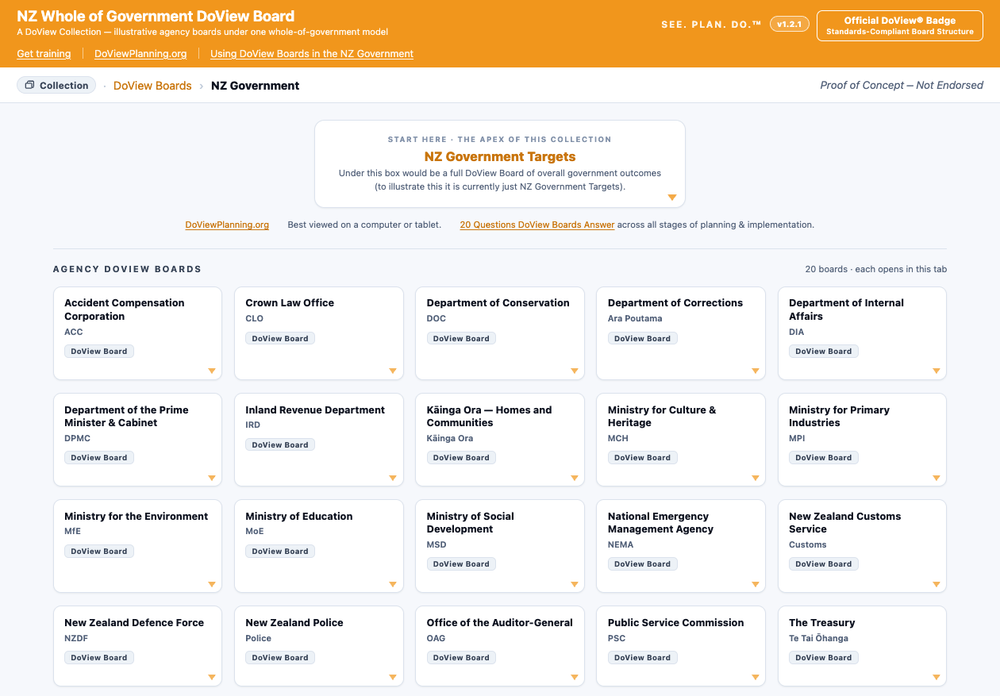
Try out any of the NZ Government Department Live Interactive DoView Boards Below
Click through any of the 30 proof-of-concept DoView Boards below to see how they answer the 20 key questions you need to answer about any government department.
How, as a new MP, can you use DoView Boards to get up to speed?
As a new MP, you urgently need a way of quickly finding out what different government departments do. The fastest way of doing this is to click through the DoView Boards for different government departments in the NZ Government DoView Board collection at DoViewPlanning.Org/NZDoview.
If there is not a proof-of-concept board for a department or agency in the DoView Board Collection, you can quickly create a new draft DoView Board using the open-source prompt for creating a DoView Board. Or get in touch with us, and we will build a board for the agency (no cost for this).
You can use any department’s DoView Board to identify what sort of questions you want to ask about a department’s work as you perform your oversight role, whether you are part of the government or in opposition.
If you like the transparency and accessibility of using a DoView Board, as an MP you can encourage any government department to create an official version of its DoView Board (see Section 4. below on how a department can do this). If a department creates its fully populated official DoView Board, the department could communicate what it is trying to do to MPs like yourself, ministers, select committees and other stakeholders much faster.
DoView Boards answer the 20 key questions that need answering about any government department with a couple of clicks within a single file. They are open-source, so anyone can use them, train others on using them, consult using them, and developers can incorporate them into any app, platform or IT system without any licensing fee. Draft DoView Boards are created in less than 20 minutes using the DoView Board Building Prompt. If you need assistance, contact us.
2. How, as an incoming Minister, can you get your department(s) to implement your priorities faster?
As a Minister, you can use a draft proof-of-concept DoView Board to start talking about your priorities to the departments you have responsibility for. Just find the department’s proof-of-concept DoView Board at DoViewPlanning.Org/NZDoView. If it is not there, then get us to build one for the department in question (no cost).
At any time, you can ask any of your departments to produce an official, fully populated DoView Board for the department. The department can use this in all discussions with you about its outcomes, your priorities, its intervention logic, projects, departmental units’ responsibilities, indicators and impact information. (See Section 4 below).
Whether you are using a proof-of-concept DoView Board from our NZ government DoView Board collection or an official department-created one, you can quickly communicate the priorities you want your department(s) to focus on by simply marking up the boxes on the coloured pages within the DoView Board.
If your department(s) have fully populated their official DoView Boards, they can then immediately show you exactly how they are aligning their activities and projects with your priorities using DoView visual alignment within their board.
You can then use departments’ official DoView Boards in all discussions with your department(s). If you do this, any of your departments can show you its outcomes, intervention logic, traffic-lighted indicators showing what progress it is making, the projects it is working on, and how it is building the competences and capabilities needed to deliver on your priorities.
DoView Boards answer the 20 key questions that need answering about any government department with a couple of clicks within a single file. They are open-source, so anyone can use them, train others on using them, consult using them, and developers can incorporate them into any app, platform or IT system without any licensing fee. Draft DoView Boards are created in less than 20 minutes using the DoView Board Building Prompt. If you need assistance, contact us.
3. How, as a political party, parliamentary caucus or Cabinet, can you translate your policy proposals into priorities for individual departments?
The sooner you can translate your policy platform into specific priorities for individual departments, the sooner you will get your policies implemented. You can immediately operationalise your proposed policy platform by going through major departments’ DoView Boards and directly marking up the boxes on the coloured pages that are the priorities you want a particular department to concentrate on.
You can have departments report back to you by traffic-lighting how they are tracking towards achieving the boxes within their DoView Board which you have marked as priorities.
When discussing issues in Cabinet, if you have all departments’ interactive DoView Boards available, you can immediately drill down into the relevant DoView Board so that all Cabinet members can see the details of what is being discussed. This means that all Cabinet members can get a clear picture of what is being discussed regardless of which Minister is responsible for a particular department under discussion.
DoView Boards answer the 20 key questions that need answering about any government department with a couple of clicks within a single file. They are open-source, so anyone can use them, train others on using them, consult using them, and developers can incorporate them into any app, platform or IT system without any licensing fee. Draft DoView Boards are created in less than 20 minutes using the DoView Board Building Prompt. If you need assistance, contact us.
4. How, as a government department or agency, can you implement a new government’s priorities faster?
Create an official, fully populated DoView Board for your department by starting with a new draft DoView Board build using the latest free open-source DoView Board prompt. If you need help with any aspect of populating your board, get in touch.
Go through the draft board, amend it and fully populate it with your outcomes, priorities, projects, departmental units’ responsibilities, indicators and how you are evaluating impact.
Use your DoView Board for all discussions and reporting to your Minister(s), select committees, auditors and other stakeholders.
Use your DoView Board to underpin and align all of your existing planning, implementation and reporting processes. It does not replace lower-level project planning. Rather, it functions to make sure your projects are aligned with your departmental priorities.
Use your DoView Board in contract discussions to communicate with providers the outcomes you want them to focus on and the outputs that they will need to deliver.
Use your DoView Board in discussions with other departments and sector organisations regarding who is doing what, gaps and overlaps and who is accountable for what.
DoView Boards answer the 20 key questions that need answering about any government department with a couple of clicks within a single file. They are open-source, so anyone can use them, train others on using them, consult using them, and developers can incorporate them into any app, platform or IT system without any licensing fee. Draft DoView Boards are created in less than 20 minutes using the DoView Board Building Prompt. If you need assistance, contact us.