
Using DoView Boards
PAGE STILL BEING BUILT
See. Plan. Do.
Quick Overview
DoView Boards are the innovative way of doing (and proving you are doing) all aspects of outcomes-based planning, implementation, measurement and reporting. Think of them as the new lightweight tool sitting above the detailed project planning level, providing a fully outcomes-based picture.
Note: you can do all of the below by hand on your DoView Board, or you can get your AI system to create an initial draft of any of the below which you can then confirm or amend.
Show your team and others your outcomes and strategy.
Prioritize exactly what you will do next.
Show your projects or activities (Integrate with your current project planning, by linking out to the specific project page in any existing project-level planning system).
Prove that what you are doing is tightly aligned with your priorities
Put measures/indicators (KPIs etc.) under any elements in your board.
Identify exactly who is doing what and accountable for what (drill down, for instance, to sections, staff members, etc.). Directly specify delegation or contracting accountabilities.
Traffic light the progress you are making.
Use your DoView Board directly in all discussions and reporting with staff, management, funders and stakeholders (Always have at your fingertips in the one board all aspects of what you are doing, how you are doing it, who is accountable for what and what progress is being made).
AdvancedAllow rigorous interrogation of the logic of what you are planning to do (exposing the This-Then claims you are making beneath your strategy).
Actually prove you are evidence-based (explicitly show that your This-Then claims are backed up by evidence).
Quickly develop and document performance measurement plans within the DoView Board.
Specify evaluation questions and quickly develop detailed evaluation plans within the DoView Board.
Easy outcomes-based coordination for joint ventures, collaborative projects, sector coordinations, and human-AI agent collaborations .
Put in other elements and map them onto your board, such as competencies, peformance measurement and/or evaluation projects.
Using DoView Boards
1. Show your team and others your outcomes and strategy.
How: Get your AI system to build a DoView Board with draft This-Then pages. These set out the high-level outcomes you want and the steps you will take to get to them. Amend any of these you need to amend and then use it to discuss your strategy with your team, managers, funders, stakeholders or other
2. Prioritize exactly what you will do next.
How: Get your AI system to prioritize what boxes you would focus on (when you create the DoView Board or later). Or go through your This-Then pages and prioritize them yourself. Discuss these priorities with whoever you need to (managers, funders, stakeholders etc.).
3. Show your projects or activities (Integrate with your current project planning, by linking out to the specific project page in any existing project-level planning system).
How: Get your AI system to create a How page with a box for each project (or activity if you are creating a DoView Board for a small-scale project). Put whatever details you want under these boxes. If you want to, you can make your project How page a level 1 How page and then make a level 2 How page. This could, for instance, have boxes for each of the teams showing which projects they are contributing to. And if you want to, make a level 3 How page with which team members are in each team. Link these up with up-and-down links so you can click through the structure. Note: if you are modeling a joint venture, collaborative project or sector you can have the level 2 How page showing organizations rather than teams.
4. Prove that what you are doing is tightly aligned with your priorities
How: Use your DoView Board to quickly prove you have alignment. Get your AI system, or do it manually to use up-and-down links between your projects/activities on your level 1 How page and the steps and outcomes on your This-Then pages. In the View menu for your This-Then pages turn on Show up-and-down links to How boxes and on your level 1 How page, in View, select Show up-and-down links to This-Then and How boxes. Look are you visually aligned DoView Board and look for cases where there is a high priority This-Then box, but it has few or no projects/activities linked to it or there is a low priority box that has too many projects/activities linked to it. Note: Most people claim they are aligning their projects or activities with their priority outcomes, but without a DoView Board, theymostly have no way of quickly proving that they are aligned.
5. Put measures/indicators (KPIs etc.) under any elements in your board.
6. Identify exactly who is doing what and accountable for what (drill down, for instance, to sections, staff members, etc.). Directly specify delegation or contracting accountabilities.
How: Get your AI system, or do it yourself, to link organizations or individuals to outcomes or steps on This-Then pages or to projects to show which they are accountable for delivering on. Or put in measures with targets and associate them with organizations or individuals as accountabilities and deliverables. Note: You can get your AI system to generate a contract from the DoView Board which includes clearly specified deliverables. Attach a read-only version of you DoView Board with the contract to ensure everyone is clear abuot what they are meant to be doing.
7. Traffic light the progress you are making.
How: Get your AI system, (e.g. from information it can find on the internet, internal documentation such as dashboards, performance management reports, evaluations etc.) or do it yourself, to traffic light progress on This-Then boxes and or Project boxes on How pages. Use the traffic lighted DoView to discuss progress. Note: If you have traffic lighted before you have a priority setting discussion as in 2. above the traffic lights will give you guidance as to what should be priorities going forward.
8. Use your DoView Board directly in discussions and reporting with staff, management, funders and stakeholders (Always have at your fingertips in the one board all aspects of what you are doing, how you are doing it, who is accountable for what and what progress is being made).
How: Get into the habit of using your DoView Board when you have any discussion with anyone about anything related to your organizaiton or initiative. Doing this means that you always have at your fingertips all of the information you need to drill down into any details about your work. At the same time you can see the helicopter view of the outcomes-based overview of what you are trying to do in your work.
Advanced
9. Allow rigorous interrogation of the logic of what you are planning to do (exposing the This-Then claims you are making beneath your strategy).
How: Use This-Then links between boxes on This-Then pages to fully explore and justify to anyone (management, funders, stakeholders, evaluators) that you have a totally clear logic of how the steps that are being taken will lead to outcomes. You can get your AI system to put in these links and then check them yourself. Get independent experts or an independent AI system to audit whether the This-Then links you are claiming are credible or not. Note: People like to claim that they have a clear intervention logic or theory of change but almost no existing inervention logic approach allows DoView Board’s fine grained visualized examination of the logic of what is being done by an organizaiton or initiative.
10. Actually prove you are evidence-based (explicitly show that your This-Then claims are backed up by evidence).
How: Get your AI system, or put in yourself, the evidence beneath each of the This-Then links between boxes on This-Then pages. Use this to prove that your organization or initiatives’ work is fully evidence-based. Get independent experts or an independent AI system to audit the claims you are making about their being evidence to support your This-Then box links. Note: Most people like to claim they do evidence-based work, but before DoView Boards, almost no one had an efficient way to quickly prove they were fully evidence-based.
10. Quickly develop and document performance measurement plans within the DoView Board.
How: Write up a full performance management plan directly within your DoView Board. Use the clone feature to include in the plan the measures you are going to measure in the plan (this means that you if you change a measure its text will be updated right across the plan. Create an additional How page with boxes for performance management projects, and attach to each box the measures they will be measuring. Note: Currently organizations and initiatives have a number of different documents for strategy, performance measurement, contracting etc. With DoView Boards you can put all of this information into the one place and know that it is fully aligned with the other pieces to documentation you have.
11. Specify evaluation questions and quickly develop detailed evaluation plans within the DoView Board.
How: Write up a full evaluation plan directly within your DoView Board using a Documentation page. Use the clone feature to include in the plan the measures you are going to measure and the evaluation questions you are doing to answer (this means that you if you change the text of one of them it will be updated right across the plan. Create an additional How page with boxes for evaluation projects, and attach to each box the measures and evaluation questions they will be focusing on.
12. Easy outcomes-based collaborative ventures for joint ventures, collaborative projects, sector coordinations, and human-AI agent collaborations.
How: The examples above have talked about using DoView Boards to organizsations or initiative. However, they can also be used for collaborations.
13. Put in other elements and map them onto your board, such as competencies, peformance measurement and/or evaluation projects.
How: Ask your AI for what other pages you should put into your DoView Board and if you wish, get it to create them. For instance you can have pages for competencies, performance measument and/or evalaution projects. Link these to whatever other elements you want to in your DoView Board. Include in it whatever you need to provide full documentation for your project.
Why DoView Boards are uniquely innovative
DoView Boards are not just another planning tool. They are a new type of outcomes app for creating and managing outcomes systems underpinning taking any type of action in the world.
DoView Boards fill the gap above outputs-level project planning, complementing rather than replacing it.
They make the higher-level “This-Then” strategic outcomes logic of your work visible and usable.
They bring together planning, implementation, and improvement in one lightweight, accessible model.
They use a visual planning paradigm that is more efficient than traditional text- and table-based approaches.
They provide an auditable single source of truth for strategy, planning, execution, measurement, improvement and reporting.
They are generic and flexible, suitable for any organization, initiative, policy, strategy, or AI agent system.
By just putting the two free provided prompts into an AI system, you can create a fully featured DoView board in minutes about any type of organization or initiative of any sort
They are an open system; you just open a standard HTML webpage viewable in any browser, with no special app needed.
They can be read and updated by your AI system and also used as the single source of truth for your AI system to develop any type of customized documentation (e.g. contracts, specifically formatted reports).
They build on the internationally recognized DoView legacy approach which has been refined through thousands of practical applications.
Initiatives like to claim they are outcomes-focused, but few are able to quickly prove it. DoView Boards are the new simple practical tool designed to prove to anyone that you are totally outcomes-focused and your strategies are evidence-based.
Developed using a novel strategy-psychology approach to planning and execution, DoView Boards reduce the cognitive load of planning work and provide a practical, visual shared-thinking tool that strengthens collaborative strategic thinking and action directly analogous to a blueprint plan when building a high-rise or using a map to plan a battle.
Why use DoView Boards?
Many organizations and initiatives work across multiple documents, plans, systems, reports, and conversations. That often leads to fragmentation, misalignment, and uncertainty about what is actually driving action.
A DoView Board provides a single source of truth that connects the essential elements of the work in one place.
It helps creates a shared view of :
what is to be achieved
what matters most
how change is expected to happen
what needs to be done
who is involved
who is accountable for what
what risks and assumptions matter
how progress will be tracked
how learning and improvement will occur
That shared view is then used as the practical foundation for coordinated organization, initiative, policy, strategy, joint venture, sector, or AI agent action.
A single source of truth in a document-swamped AI age
In addition to using your DoView Board directly in any browser for as the single source of truth for planning, execution and reporting, you can use it as the authoritative source when you get AI to generate plans, reports, summaries, analyses, contracts and other documentation in any specific format you need.
If different documents are produced separately, how do you know they are tightly aligned with the actual priorities, logic, accountabilities, measures, and intended outcomes?
The answer is to use a DoView Board as the single source of truth. It becomes what is now being called the ‘system of record’ for your organization or initiative. If you always draw from it, you always know the provenance and alignment of the information you are basing your other documentation on.
When your board provides the core structure, AI-generated material can be anchored to one coherent, auditable model rather than getting strategic drift across disconnected documents, interpretations, or assumptions.
Fully Open Use But You Can Collaborate With Us If You Want
DoView Boards are intended to be used widely.
Anyone can:
build a DoView Board for free using our two provided prompts
use DoView Boards in their own work
consult using them
train others in their use
build them into any application, planning or other platform, or system
Just acknowledge that you are using them.
However, if you want us to assist you, get in touch regarding:
creating and using your DoView Board
training
implementation
incorporating or extending their use in tools, apps, systems, or platforms
if you want us to certify that a particular DoView Board implementation in an app, platform or system meets the official DoView Board specification and you to use this recognition
Everyone plans
Everyone plans. Families plan. Teams plan. Businesses plan. Governments plan. People plan their work, their lives, and their futures. AI systems do too. But while everyone says we should be outcomes-driven, most planning tools just push us straight into the detail of tasks, projects, and activity lists before we have clearly mapped what we are actually trying to achieve.
A light-weight ‘outcomes processor’
DoView Boards is a light-weight ‘outcomes process’ that solves that problem.
At the moment the idea is that somehow we are expected to hold a mental model of the outcomes we are pursuing in our heads as we do our detailed planning. A DoView Board gets that mental model out of our heads into a visual tool that we can use to plan ourselves and discuss our planning and implementation with others who we are collaborating with. A DoView Board gives you a clear visual map of your strategic logic. It’s a practical, easy-to-follow picture of if we do this, then this is what should happen. It helps you step back, see the bigger picture, and connect actions to outcomes before getting lost in the detail.
The missing layer above project planning
That is why DoView Boards are the missing layer above traditional project planning. They help create true outcomes-driven project alignment, so the work being done is tightly connected to the results being sought. Without that alignment, even well-run projects can waste time, effort, and money.
A single source of planning truth
A DoView Board becomes the single source of truth for your planning. From one shared visual logic, you can drive prioritization, alignment, implementation, measurement, evaluation, contracting, delegation, and continuous improvement.
Works with existing project tools
You can use a DoView Board on its own for simple planning, or alongside detailed project management tools for more complex work. Simply link each project or action in your DoView Board to the relevant project page URL in your project management system, such as Microsoft Project, and keep your high-level outcomes and the operational detail fully aligned.
Simple to use, powerful in practice
DoView Boards are simple enough for everyday use but also powerful enough for complex work. You create a DoView Board with an AI prompt, amend it to exactly match what you are doing and then use it to oversee all aspects of planning, implementation, reporting and improvement.
You simply open a DoView Board in a normal browser as a local normal HTML file, you can edit it and use it to do your planning and implementation. You can also connect the Board Chat in a DoView Board to AI so you can chat to your board.
If you explore the features of your DoView Board you will find all of the functionality you need for all aspects of planning and execution.
Anyone can build DoView Boards into anything
DoView Boards are a fully open methodology any developer can build DoView Boards into any app, platform or system to tailor them to their sector, setting, other planning systems and their particular workflow. They just need to acknowledge that they are creating DoView Boards and using DoView Planning as part of their planning and implementation approach.
Click on links below to download prompts
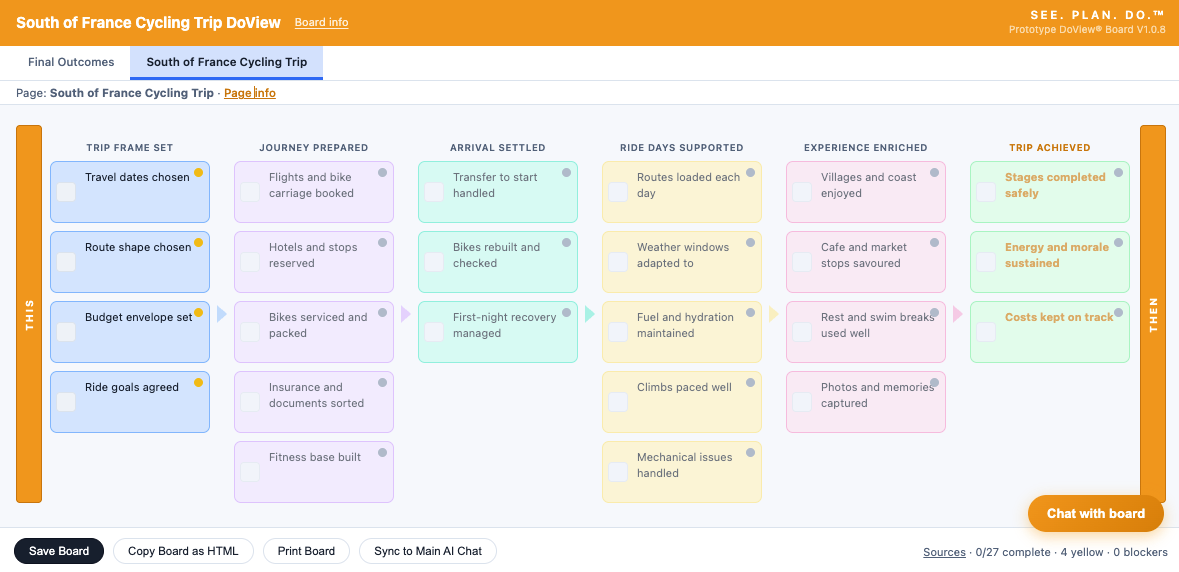
See the logic of what you want to do in a clear visual format. Use the Interactive DoView Board prompt to create a DoView Board about anything you plan to do. DoView boards are drawn according to a standard set of rules to make sure they can be used in all parts of the planning process. They are a standardized type of strategy map, intervention logic, or theory of change.
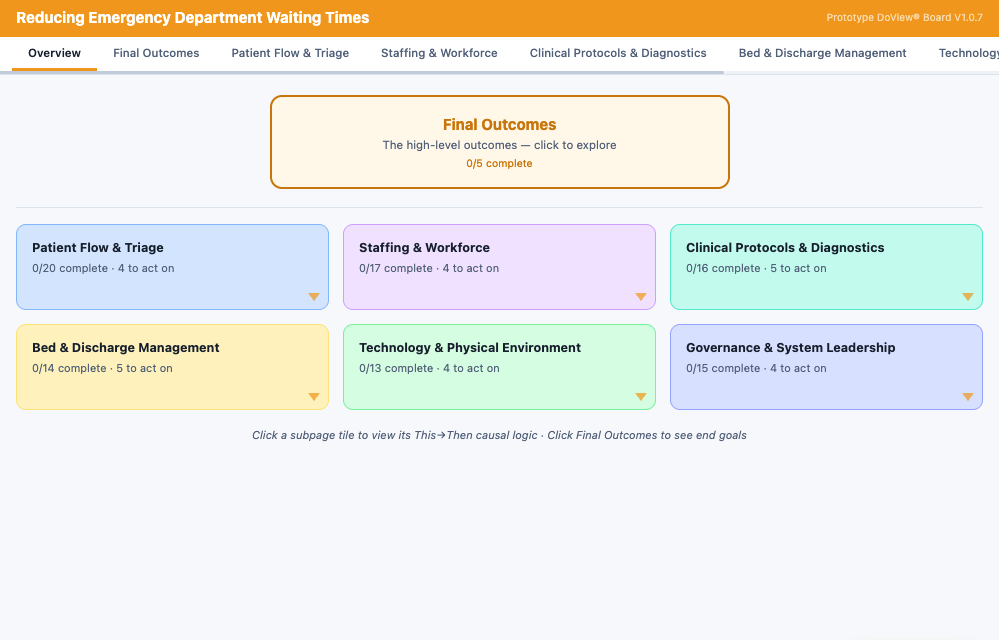
Boards can be multi-page. DoView Boards are designed to model any type of human or AI agent activity. This means any type of organization, program, policy, initiative, strategy or process that consists of taking a set of steps to achieve outcomes of any sort.
Put evidence supporting the This-Then logic of your board. In simple DoView boards this is done by putting the evidence into Page Info. In the future, specialized DoView Boards could be made to allow users to put evidence under specific links).
Prioritize the boxes in your DoView NOT YET PUT UP
Align the boxes in your DoView NOT YET PUT UP
Show which parties are doing what in our DoViewew NOT YET PUT UP
Contract or delegate.
Measure and manage performance NOT YET PUT UP
Put indictors on your board impact NOT YET PUT UP
Put indictors on your board impact NOT YET PUT UP
Plan
Do
traffic light the progress you are making with implementation
put indicators under boxes in your board — identifying how to track progress
put evaluation questions under boxes in your board — improving implementation and proving impact