
DoView Boards
“Sometimes elegance and simplicity define use”
See. Plan. Do.
This page is still under construction
Quick Overview
The quote above about elegance and simplicity is from the Gartner Research citation when they awarded DoView legacy app, which DoView Boards are inspired by, Gartner Cool Vendor recognition. It nicely captures the vision for DoView Boards.
A new paradigm outcomes or intent processor
DoView Boards usher in a new paradigm for integrated outcomes-driven strategy, planning, implementation, delegation/contracting, measurement, evaluation and reporting. Traditional planning approaches have focused on the minutiae of the how, DoView Boards are entirely structured around the why, the This-Then logic of the outcomes you are seeking and the steps needed to get to them. They are the missing layer above traditional project planning. They help create true outcomes-driven project alignment, so the work being done is tightly connected to the results being sought. This new approach allows DoView Boards to be used for all stages of the strategy, implementation, measurement and improvement process.
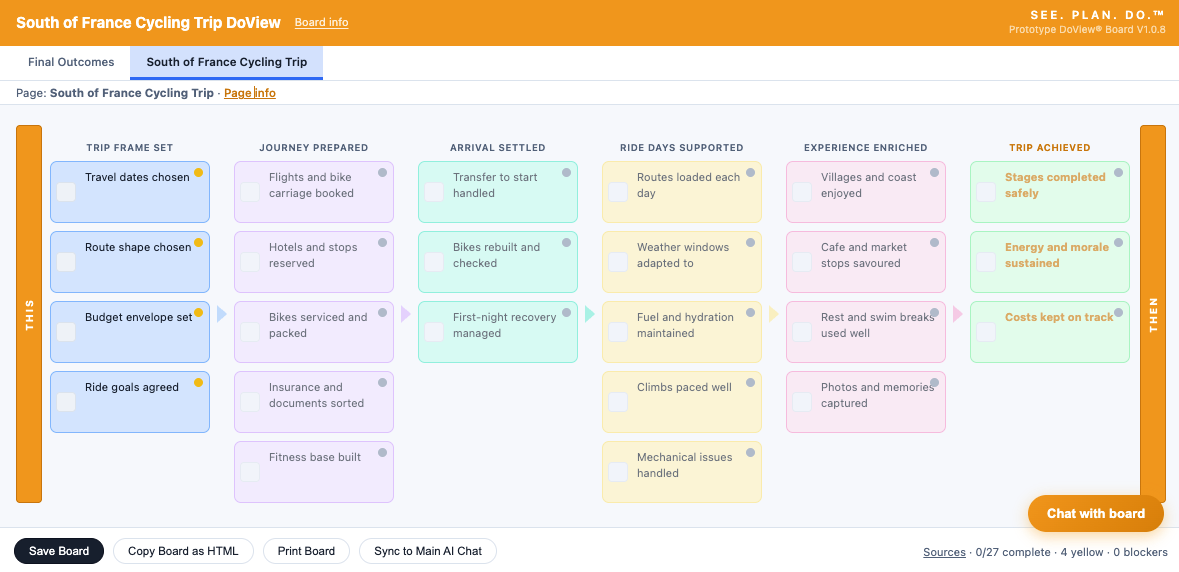
Based on clear visualized This-Then logic
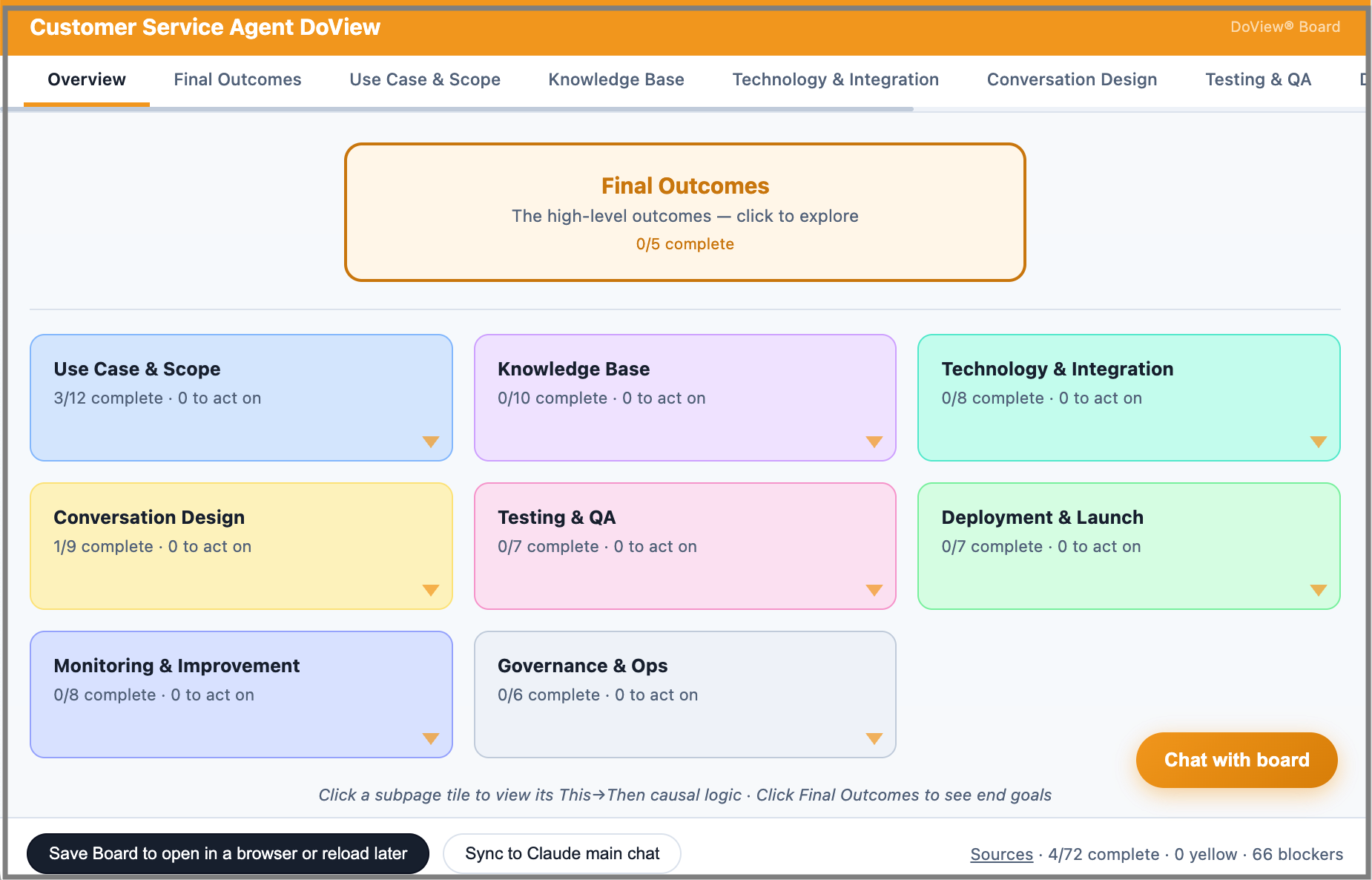
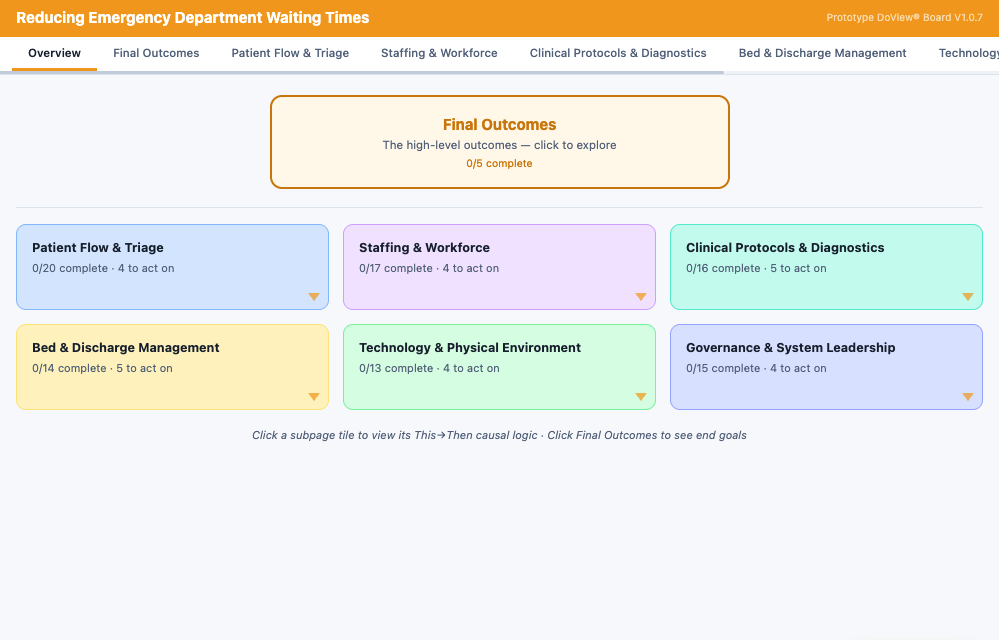
DoView Boards are drill-down visual planning and coordination boards based on a specific type of tightly specified This-Then causal logic flow. You can use them in many formats, for instance as an interactive webpage model, PowerPoint, PDF etc. And now you can play around with thr prototype fully interactive, AI-powered DoView Boards (use them in your AI system, or in any browser).
May become a GUI-type interface for interacting with AI
DoView Boards can be used to control and direct organizations. By analogy, DoView Boards have the potential to provide a GUI-type visual interface to AI when we want to control and direct it. This would allow humans to interact with AI systems visually rather than through the current text-based approach.
Free ways of building DoView Boards
This page gives examples of DoView Boards and links you to free AI prompts for quickly building DoView Boards in different formats. The first is a Claude and ChatGPT prompt for building an interactive webpage DoView Board (HTML) that you can put information into, chat with, and amend. Second, there is a ChatGPT 5.2 prompt that lets you build a DoView Board in Powerpoint. Third, if you want, you can download the award-winning DoView legacy app and draw DoView Boards yourself without using AI.
Anyone can use and expand on the development of DoView Boards
Anyone (just with acknowledgment) can create, use, consult on and teach the use of DoView Boards and the wider DoView Planning methodology for commercial or other purposes. In addition, developers are encouraged to further develop DoView Boards in any direction they wish, based on the DoView Board Minimum Specification. This sets out the minimum base level of functionality in a DoView Board (described as simple DoView Boards here in contrast to expanded DoView Boards). You can expand DoView Boards in any direction, incorporate them into apps, platforms and systems of any type. Resources for developers, including a DoView Board engine are at github.com/doviewplanning/doviewboards). Apart from any other applications, one thing that would be great would be if anyone wants to experiment with developing a way of using them, as discussed above, as a direct GUI interface to AI. This would provide a concrete tool for what is now being called intent engineering. As with human organizations, being able to articulate to AI what you want it to do at a high level and have it communicate back to you against that intent structure would provide a better way of getting Ai to do what we want ti to do.
Please note that the interactive AI-powered prompt provided here creates a free prototype DoView Board. Use it at you own risk, this is sill a prototype. See the Disclaimer at the bottom of any DoView Board.
DoView Boards are built on a few simple ideas:
Provide one shared visual map of what you are trying to do, so everyone is working from the same picture (just like a building’s blueprint or a general’s map).
Have a single place to show the key parts of a strategy, from actions through to outcomes, risks, measures, and evidence.
Using a specific format that can be used across all stages of planning, implementation, measurement, and reporting.
Providing an easy way to see a helicopter view and then immediately drill-down to detail and come back up again.
A ‘simple but not simplistic’ way of seeing, prioritizing, aligning, recording and tracking what you are trying to do.
Everyone plans
Everyone plans. Families plan. Teams plan. Businesses plan. Governments plan. People plan their work, their lives, and their futures. AI systems do too. But while everyone says we should be outcomes-driven, most planning tools just push us straight into the detail of tasks, projects, and activity lists before we have clearly mapped what we are actually trying to achieve.
A light-weight ‘outcomes processor’
DoView Boards is a light-weight ‘outcomes process’ that solves that problem.
At the moment the idea is that somehow we are expected to hold a mental model of the outcomes we are pursuing in our heads as we do our detailed planning. A DoView Board gets that mental model out of our heads into a visual tool that we can use to plan ourselves and discuss our planning and implementation with others who we are collaborating with. A DoView Board gives you a clear visual map of your strategic logic. It’s a practical, easy-to-follow picture of if we do this, then this is what should happen. It helps you step back, see the bigger picture, and connect actions to outcomes before getting lost in the detail.
The missing layer above project planning
That is why DoView Boards are the missing layer above traditional project planning. They help create true outcomes-driven project alignment, so the work being done is tightly connected to the results being sought. Without that alignment, even well-run projects can waste time, effort, and money.
A single source of planning truth
A DoView Board becomes the single source of truth for your planning. From one shared visual logic, you can drive prioritization, alignment, implementation, measurement, evaluation, contracting, delegation, and continuous improvement.
Works with existing project tools
You can use a DoView Board on its own for simple planning, or alongside detailed project management tools for more complex work. Simply link each project or action in your DoView Board to the relevant project page URL in your project management system, such as Microsoft Project, and keep your high-level outcomes and the operational detail fully aligned.
Simple to use, powerful in practice
DoView Boards are simple enough for everyday use but also powerful enough for complex work. You create a DoView Board with an AI prompt, amend it to exactly match what you are doing and then use it to oversee all aspects of planning, implementation, reporting and improvement.
You simply open a DoView Board in a normal browser as a local normal HTML file, you can edit it and use it to do your planning and implementation. You can also connect the Board Chat in a DoView Board to AI so you can chat to your board.
If you explore the features of your DoView Board you will find all of the functionality you need for all aspects of planning and execution.
Anyone can build DoView Boards into anything
DoView Boards are a fully open methodology any developer can build DoView Boards into any app, platform or system to tailor them to their sector, setting, other planning systems and their particular workflow. They just need to acknowledge that they are creating DoView Boards and using DoView Planning as part of their planning and implementation approach.
Click on links below to download prompts
See the logic of what you want to do in a clear visual format. Use the Interactive DoView Board prompt to create a DoView Board about anything you plan to do. DoView boards are drawn according to a standard set of rules to make sure they can be used in all parts of the planning process. They are a standardized type of strategy map, intervention logic, or theory of change.
Boards can be multi-page. DoView Boards are designed to model any type of human or AI agent activity. This means any type of organization, program, policy, initiative, strategy or process that consists of taking a set of steps to achieve outcomes of any sort.
Put evidence supporting the This-Then logic of your board. In simple DoView boards this is done by putting the evidence into Page Info. In the future, specialized DoView Boards could be made to allow users to put evidence under specific links).
Prioritize the boxes in your DoView NOT YET PUT UP
Align the boxes in your DoView NOT YET PUT UP
Show which parties are doing what in our DoViewew NOT YET PUT UP
Contract or delegate.
Measure and manage performance NOT YET PUT UP
Put indictors on your board impact NOT YET PUT UP
Put indictors on your board impact NOT YET PUT UP
Plan
Do
traffic light the progress you are making with implementation
put indicators under boxes in your board — identifying how to track progress
put evaluation questions under boxes in your board — improving implementation and proving impact