
Whole-of-Government DoView Board Planning
The new visual approach to government planning prioritization, planning, implementation, contracting, improvement, impact & accountability

See. Plan. Do.
Quick Overview
Governments are very large organizations working across many sectors at once. Their scale makes planning, implementation and reporting hard. Existing government planning systems have grown over time and are a mix of tradition, convention, statutory requirements and sound and sometimes not so sound pragmatic reform attempts. When new governments take power, they often begin changing the existing government planning machinery. Think of a large government as an aircraft carrier. A new captain would not start by rebuilding the communications between the bridge and the engine room. They would expect it to work to direct the carrier at the speed they want in the direction they want. That governments so often feel the need to tinker with the government planning system points to a deeper problem.
There is still no widely recognized, standardized, robust and practical whole-of-government planning system. DoView Planning and the use of DoView Boards is a candidate for one. Because of the way it is designed, if such a system were put in place, any government, of any orientation, could use the system to steer its country in the direction it chooses as soon as it takes power. This page sets out the ten steps in a government's planning, implementation and reporting cycle, and shows how DoView Planning and open-source DoView Boards support each of the steps. The technical detail is fully documented in the DoView Planning and Practical Outcomes Theory Handbook (2026).
DoView Boards are an open source project, and developers are free to built them in any apps, platforms or systems used by any government (just with acknowlegment that they are using DoView Boards). In addition, anyone is free to use, consult on or train others in the use of the DoView Planning and DoView Boards methodology (again just with appropriate acknowledgment). If you want us to assist you in using or training regarding DoView Planning and DoView Boards in a government or other context, get in touch.
While this shows how government could use DoView Planning, the same methodology, with some adaptation, could be used for large companies and large international organizations.
Piloting Whole-of-Government DoView Planning
Aspects of DoView Planning have been used in hundreds of government initiatives across many sectors, so it has been shown to work at lower levels within government agencies. Comprehensive whole-of-government use across a national or regional government is still in its early days. A full Whole-Of-Government DoView Planning system using DoView Boards would need to take into account the particular government’s statutory requirements, existing practice, staff training, information infrastructure, and institutional change management. So a government interested in Whole-of-Government DoView Planning should approach its implementation in stages.
Encourage individual departments to use DoView Boards on stand-alone initiatives. The DoView methodology has been shown to work well at this level, and its use would build the number of officials familiar with the method, a prerequisite for wider adoption. All the resources needed for government agencies to do this are available on this site. The DoView Handbook covers common planning problems, and how it can be used in government planning is set out on this page. The free AI prompt can be used to build a draft DoView Board for any government initiative, large or small.
Build a proof-of-concept Whole-of-Government DoView Board Collection. Doing this would show how such a collection can provide a helicopter and drill-down detailed picture of what a government is trying to achieve, structured around its outcomes, priorities and the steps it is using to work towards its outcomes. This would immediately provide a working tool that decision-makers and officials could start experimenting with to see how DoView Boards could add value to planning, implementation, and reporting across the government. Such a proof-of-concept DoView Board Collection has been created for the NZ Government, and the frameworks for such collections have also been prepared for NZ Local Government, the UK Government, the US Washington State Government and the Queensland Government in Australia.
Let individual agencies use DoView Boards alongside how they currently meet existing planning, measurement and reporting requirements. This type of approach (a DoView outcomes diagram) has already been used in this way in a number of instances. Encouraging this step would provide further learning about the use of DoView Boards in the context of the particular government’s planning, implementation and reporting system.
Pilot the comprehensive use of a DoView Board by one or more government departments, using it for each of the ten steps below. Evaluating its feasibility and usefuless would provide valuable lessons for the use of DoView Boards in the context of the particular government.
If piloting was successful, implement a wide rollout of DoView Boards and DoView Planning across the government. This would require integrating them into the government’s IT system (DoView Boards are open source so require no license fee for their incorporation into a government’s system); training decision-makers and officials in their use; and ongoing quality assurance of the use of DoView Boards; dissemination of suitable guidance; and, if necessary, any changes to regulations or legislation to facilitate the use of DoView Boards within the government’s planning process.
Government Planning, Implementation and Reporting Cycle
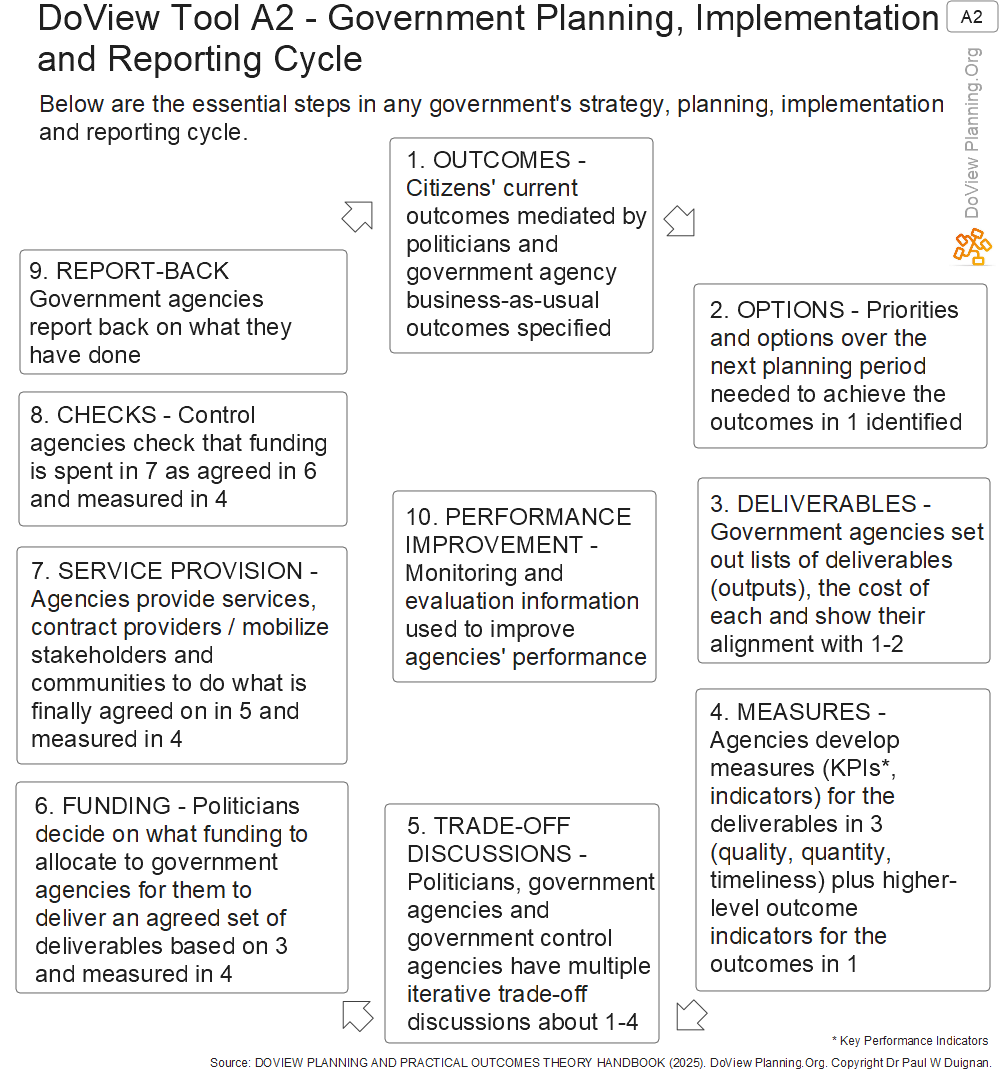
The Government Planning Implementation and Reporting Cycle consists of ten steps. These are set out in the following DoView Planning Tool (Tool A2) from the Handbook.
How DoView Planning can be used in each of these steps
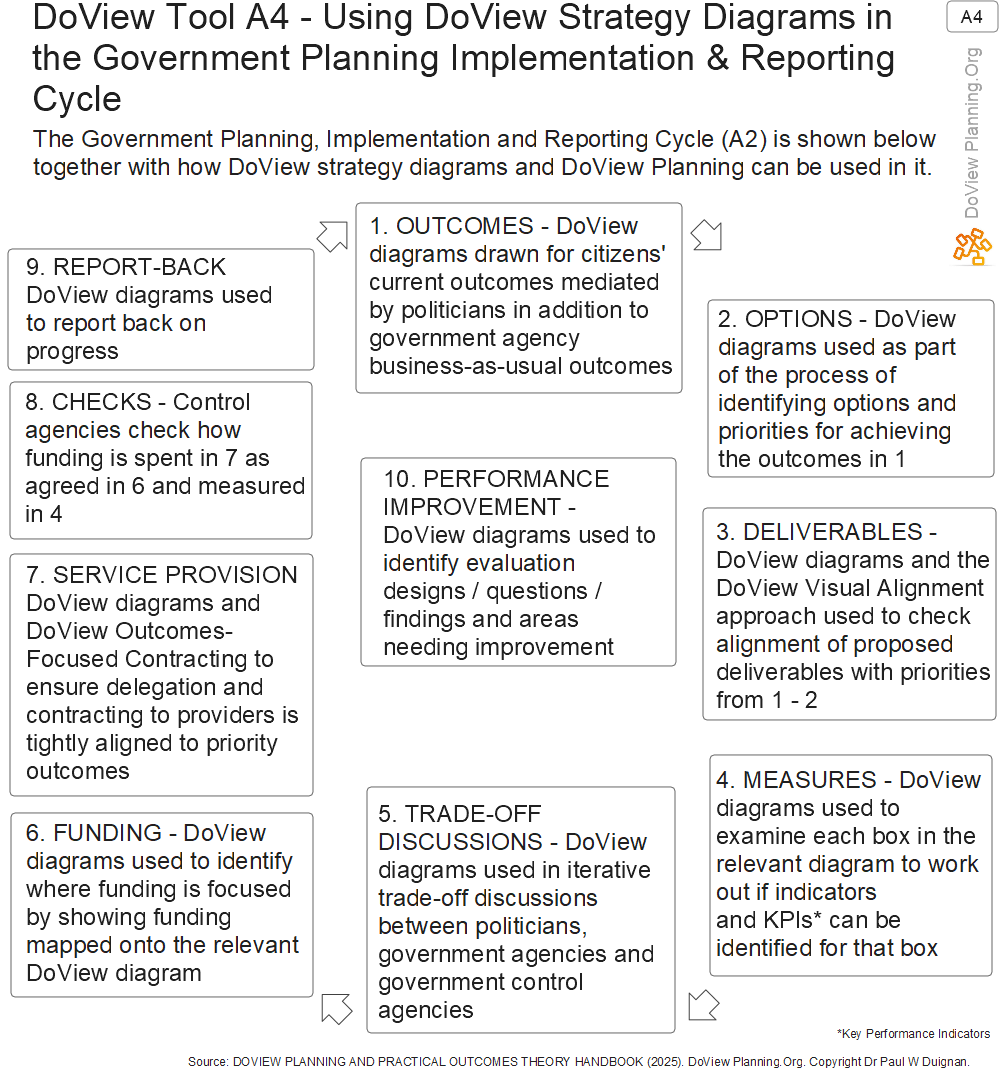
DoView Planning and DoView Boards can be used in each of the steps of the government planning, implementation and reporting cycle. How it can be used is shown in the DoView Tool below (Tool A4).
Outcomes - The department draws a DoView diagram of what it is trying to do
The first step in the government planning, implementation and reporting cycle is to specify the outcomes and the steps that lead to them which a department is attempting to achieve through its work. This is done by drawing a DoView diagram of what the department is trying to achieve. Such DoViews are drawn according to the DoView Drawing Rules to ensure that they are fit for purpose for all stages of DoView Planning. A draft of them can be quickly created using the AI DoView Drawing Prompt.
DoView Diagrams Can Include More Than Just Current Priorities
In DoView Planning, DoViews are not just drawn to include only current priorities. Where it is feasible to do so, they are drawn to be somewhat more general than that. The idea is to ask oneself the question, ‘Over the next few years, could you imagine this box potentially being taken as a step towards achieving higher-level outcomes even though it might not be a priority at the moment?’ Once the DoView has been drawn in this way, priorities are then set for a subset of boxes within the more comprehensive DoView. Doing it in this way ensures that DoView diagrams have greater longevity than traditional text-based strategic plans, which only include current priorities. It also means that in a very dynamic age, such as the current one, a department can quickly change its strategy just by changing the priority it puts on different boxes while keeping the underlying DoView diagram the same. Keeping the diagram the same as much as possible means that politicians, officials and stakeholders become familiar with it and can use it in different aspects of their own work. This is a more agile approach than having to rewrite a text-based strategic plan from scratch each time that strategic imperatives change.
This Approach is Feasible
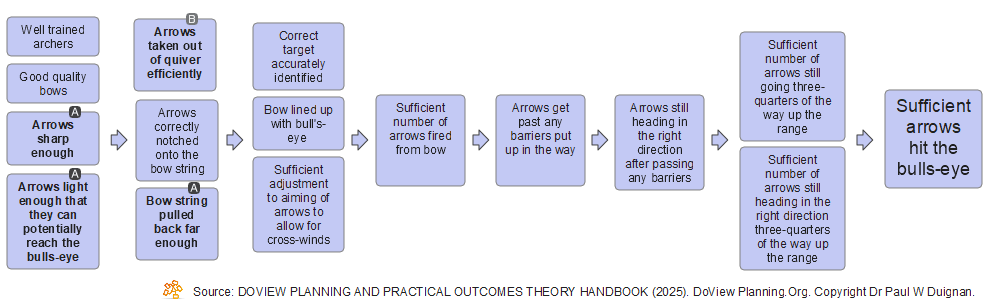
This approach to drawing DoViews has been used in hundreds of instances. In the case of government planning it is feasible because it is often possible to draw a DoView that includes a reasonable range of boxes that will appeal to different government administrations. For instance, regarding a particular issue, one government administration may prefer an educational approach, while the next government may prefer a more regulatory approach. If both boxes are included within the relevant DoView diagram, the underlying DoView diagram often does not need to be substantially amended just because of a change in government. As discussed in Step 2, the relevant Minister (Secretary in the U.S.) just needs to go through the DoView diagram and change the priorities on boxes within it to match which particular boxes they want the department to focus on in the next planning period. Once they understand this approach, Ministers only need to be assured that the relevant DoView diagram they are working with includes sufficient boxes that capture the particular approach that they want to take and which they can highlight as priorities by simply marking them up as priority boxes. Below is the illustrative Archery Initiative DoView diagram that is being used on this page to illustrate Whole-of-Government DoView Planning.
Experience using DoView Planning for this step. One Minister, on being shown a DoView diagram of an initiative they were reviewing produced outside of the relevant government department, is reported to have said something along the lines of, ‘Why doesn’t my department produce diagrams like this explaining what is being attempted?’.

Building a Whole-of-Government DoView
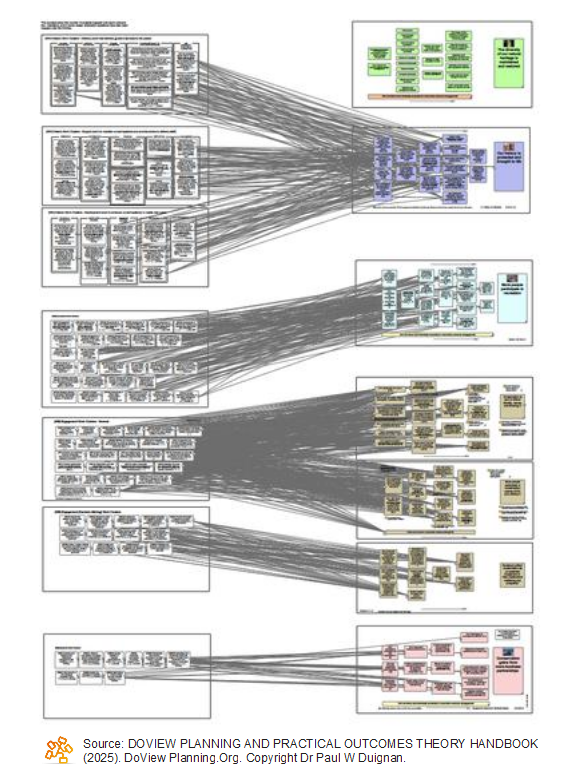
Using the DoView Planning for Government approach, a comprehensive drill-downable Whole-of-Government DoView can be built. This is an integrated DoView diagram that starts with a government’s high-level outcomes and then drills down to department’s DoView diagrams. It could then even drill down to DoView’s for providers that are delivering government-funded services. The diagram below shows how this is structured. Below the diagram is an illustrative Whole of Government DoView (this part of such a diagram of the NZ government, but it is not endorsed by the NZ government).

Full Screen version. Large file may take time to load.
2. Options - Options are discussed against the DoView diagram and the Minister sets priority boxes
This step consists of the Minister, departmental staff, stakeholders and in some cases, consultations with the public being used to consider the various options for how to proceed in regard to a particular issue or initiative. Given the generic way in which DoView diagrams are drawn, they can provide the basis for a fruitful discussion about the possible ways of moving forward on an issue. The fact that a DoView diagram can include a range of different ways of achieving outcomes means that using one encourages a wide consideration of the possible ‘strategy space’ from which options and then priorities can then be selected.
The marked-up DoView diagram below shows how priorities have been set by a Minister (Secretary, Board or others in charge) as to where they want the focus to be in over the next planning period.
Experience using DoView Planning for this step. DoView Planning has been used on a number of occasions at various levels within the public sector to set priorities. It has been used at the executive team level where an executive team has set the priorities for an organization which are then translated into projects and activities that are aligned with these.
3. Deliverables - Deliverables are specified by the department and their alignment with priorities is checked
Once the Minister (Secretary, Board or others in charge) have set their priorities on the DoView diagram in Step 2, in Step 3, deliverables (sometimes called outputs) are specified. This is the set of deliverables the department believes will achieve the priority outcomes selected by the Minister.
In any planning, particularly in the complex area of government planning, it is possible to have a perfect set of high-level priority outcomes and well-implemented projects taking place on the ground. However, even if projects are being implemented well, if they are not the set most likely to achieve priority outcomes, resources are likely being wasted.
In the private sector, this challenge is managed under the heading of enterprise portfolio management*.
The DoView diagram can be used to specify deliverables that could be used to achieve higher-level outcomes. These are sometimes called outputs.
In the highly simplified example immediately below, you can see that three projects are being proposed and they have been mapped onto the DoView to show which boxes it is believed that they will influence. Note that this diagram also shows that there is no project focusing on the box ‘Arrows sharp enough’, which is also a priority. This very simple example shows how DoView Visual Alignment can be used within DoView Planning for discussing options. In practice, with a large government department, this process will be much more complex. This is shown in the diagram following the one immediately below.
* It is worth noting that the DoView legacy outcomes app won Gartner Cool Vendor recognition in the Enterprise Portfolio Management category.
Experience using DoView Planning for this step. A government department was coordinating a number of different projects run by other departments. Doing DoView Visual Alignment meant that it was easy to see where there were gaps and overlaps in the mix of projects that were being undertaken. Prior to using DoView Visual Alignment with this example, an attempt was made to determine alignment by including a block of text that spelt out the outcomes each project was focusing on in the project’s description. This was a highly inefficient way of attempting to establish alignment with a very high cognitive load. The expectation was that someone would read the large number of outcome statements for each project and, on the basis of this, be able to determine if there was alignment of the set of projects with high-level outcomes.

Scalability of DoView Visual Alignment
Given the size of government agencies, one needs a suitable visualization app or platform to do DoView Visual Alignment at scale. In the image shown below, it has been done with the DoView legacy outcomes app. However, governments wishing to implement DoView Planning may want to implement the methodology in their own information systems. Anyone can incorporate DoView Visual Planning within any app, platform and system as long as they acknowledge that they are building DoViews and doing DoView Visual Alignment.
4. Measures - The boxes in the relevant DoView are examined to work out which can be measured
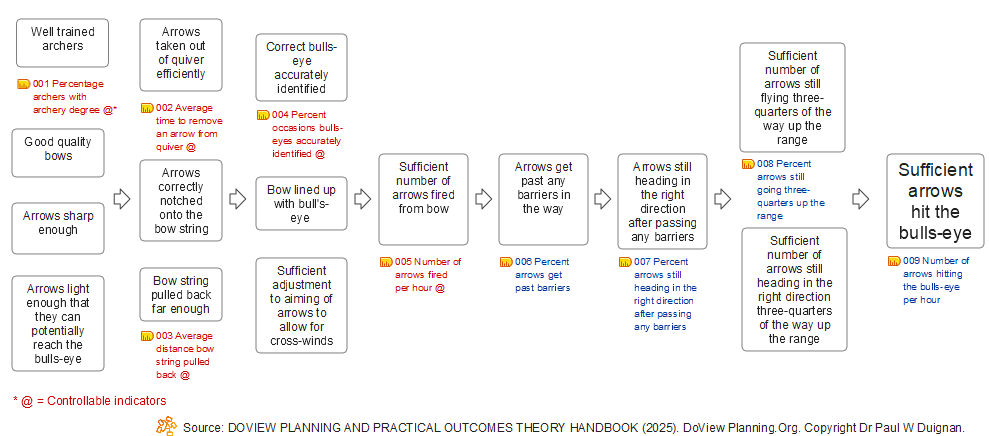
The next step in DoView Planning is to decide how you are going to measure what it is that a government is seeking to do. Due to their size, governments typically have a large number of indicators. If these are presented as they often are, just within a spreadsheet, it is very hard to work out if the set of indicators you are using is measuring all of the important things that you should be measuring. The best way to work this out is to map your indicators onto the underlying DoView diagram for a government department or for a higher-level DoView that sets out a government’s higher-level outcomes. If you do this, you can immediately see which boxes in the DoView are currently being measured and which are not. This lets you identify if you have areas of ‘strategic blindness’ within the DoView due to there not being any indicators measuring particular sets of boxes.
What’s Currently Being Measured Tends to Reflect Yesterday’s Strategy
Measuring indicators requires institutional discipline and costs time and money. As a result, the set of indicators being measured at any point in time tends to be made up of measures of things that were previously thought to be strategically important and therefore worth investing in. If one wants to promote innovation, then it is important not to just measure what was measured in the past. Rather, one should be thinking in terms of what new things need to be measured. Mapping indicators onto the relevant DoView diagram enables you to immediately see what is, and what is not, being measured and highlights where you should invest in terms of measurement in the future.
The DoView below shows indicators mapped onto the illustrative Archery Initiative DoView. As a result, just briefly looking at the DoView, you can immediately identify what is and what is not being measured. If you were simply shown a non-visualized list of indicators, it would be much harder to determine whether everything that it is important to measure is being measured.
Experience using DoView for this step. DoView Planning’s approach to setting indicators has been used a number of times within the public sector. In one instance, a deputy Chief Executive of a government agency, after a planning meeting in which DoView Planning was used to clarify exactly what the department was measuring, reporting on and being held accountable for, told the facilitator that they regarded the meeting as one of the most useful and efficient organizational meetings they had participated in in their entire career.
5. Trade-Off Discussions - Iterative trade-off discussions take place against the DoView diagrams
Governments never have enough money to do everything that they want to do. Therefore trade-off discussions need to take place. These are very complex discussions in which those making the trade-offs need to understand exactly what is being proposed in different departmental bids. These are best done against the relevant DoView diagrams so that those concerned in making such decisions understand the implications of the trade-offs in terms of the outcomes that are being focused on by particular initiatives that could be funded.
These discussions can be assisted by being done against the relevant DoView diagrams. One of the ways DoViews can help with such discussions is that they let those having them very quickly look at a helicopter view of what is being proposed in a particular area and then rapidly drill down to get as much detail as they need regarding what is being proposed. They can see exactly what priorities are being focused on and what projects/activities are being proposed. This means that decision-makers can quickly get a finer-grained view of what they are trading off and how to optimise funding so that they spend funding in the best way to achieve their most important priorities.
Experience using DoView for this step. In one example, a set of projects were being considered for funding to achieve a common set of outcomes. Initially, there were $80 million worth of project bids. After a meeting with stakeholders, using DoView Visual Alignment to identify gaps and overlaps, the bids were reduced down to $14M.
6. Funding - DoView diagrams can be used to show the outcomes on which funding is focused
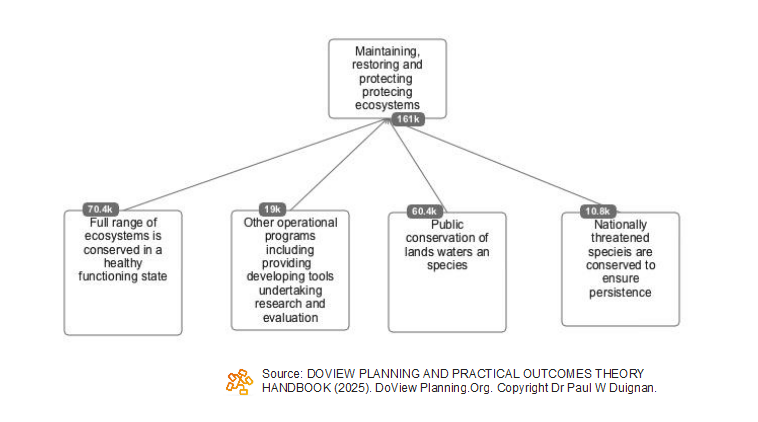
Governments spend large amounts of money, and it is often hard to fully understand where government funding is being targeted. There are various complexities involved in allocating funding to specific outcomes; however, if this is believed to be feasible in a particular instance, the results could be represented on the relevant DoView diagram. The diagram below shows how this could be done.
7. Service Provision - DoView diagrams used to ensure that the priority outcomes being sought are being translated into action on the ground
This step in the government planning, implementation, and reporting cycle occurs after decisions have been made regarding where government funds are going to be spent, which was done in the previous step. It is essential that priorities identified during higher-level planning and decision-making are actually translated into action on the ground. In a very large organization, such as a government, it is very easy for ‘strategic slippage’ to occur. Strategic slippage occurs where, as priorities are communicated down through the various levels of the organization, strategic drift occurs where, at each point, the strategy is converted into different forms of documentation. If there is not one single ‘source of truth’ regarding strategy, it is easy for what is represented within documentation (such as the plans of individual units within a government department or in contracts with external providers) to drift away from strictly focusing on the priorities that have been specified.
DoView Planning ensures that strategic slippage does not occur by using the orginal DoView used in initial planning and marked up with priorities as the basis for planning documentation at every level within the organization. It provides the ‘single source of truth’ for the organization’s strategy. Typically, more detailed DoViews are then built beneath this DoView, but they are in alignment with it because they are essentially further ‘drill-downs’ under it.
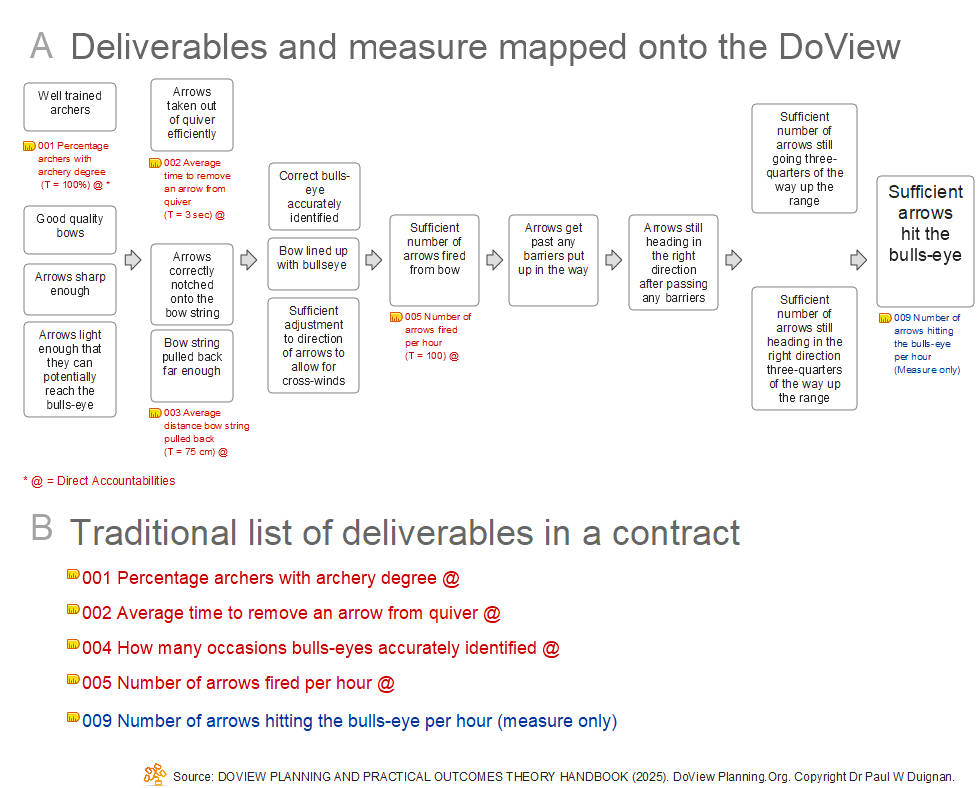
The diagram below shows how a DoView diagram can be marked up with accountability indicators and targets for a provider and included in its contract. There are advantages to doing this rather than simply providing the provider with a list of deliverables, as is the usual way contract accountabilities are included within a contract. With the DoView approach, the provider can see their accountabilities and targets in the wider context of the steps and outcomes being sought by the funder and the other indicators that, while not direct accountabilities, are being collected for strategic purposes.
Using the Relevant DoView in Contract Negotiations
There are also huge advantages in having contracting discussions against the relevant DoView. Often in contract negotiations, funders and providers end up talking past each other because there is no certainty that they are working off the same underlying ‘This-Then’ logic of what it trying to be achieved. Working off a DoView diagram that is going to be used in the final contract to specify indicators and accountabilities is a much more transparent and coherent way of negotiating any contract.
In the diagram below, ‘A’ shows the contract deliverables with targets mapped onto the relevant DoView. There is also one measure for the final box (in blue), which is just a requirement that the provider measures and reports on this, but they are not held directly to account for it in this case because of the other factors which affect its achievement–the wind and the number of barriers on the archery range. ‘B’ shows the traditional approach to contracting where all that is given is a list of deliverables without placing them in the visual context of the relevant DoView.
Experience using DoView Planning for this step. A public sector organization contracting providers in its sector included a marked-up version of a DoView in the providers’ contracts. This meant that providers were working off the same DoView diagram that had been used in establishing priorities for the organization.
8. Checks - Control agencies
Government audit control agencies have the job of making sure that expenditure is actually being spent on exactly the things that the funding has been ‘appropriated’ for by the country’s parliament. At the moment, control agencies examine documentation which includes blocks of text that describe what the funds are meant to be spent on. If Whole-of-Government DoView Planning is used then DoViews would be available which set out the intention for where funds should be spent. This would provide more granular detail for the government audit control agencies to be able to work out whether funding is being spent on the right things.
9. Report-Back - DoView diagrams used to report back to the legislature and public
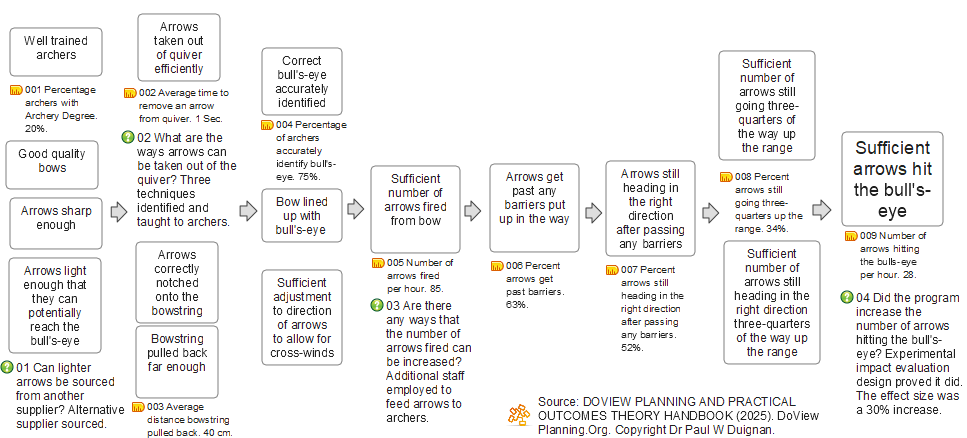
The way that governments report back on their activity at the moment can be rather obscure. Long documents are prepared, but apart from for the people who prepare them and a few others, they often do not serve as a fast way for busy decision-makers, stakeholders, or lay people to get an idea of what a government has actually achieved. With DoView Planning, in addition to whatever statutory reporting is currently required by a particular government, results can be reported back against the relevant DoView. The diagram immediately below shows boxes in the DoView being traffic-lighted to show the progress made on each of them. The DoView following that shows both indicators and the results of evaluation questions being reported back onto the relevant DoView diagram.

10. Performance Improvement - Monitoring and evaluation information used to improve agencies’ performance
The tenth and last stage in the Government Planning, Implementation, and Reporting Cycle is concerned with performance improvement and evaluation. In addition to the other stages in the cycle, there needs to be a stage which focuses on performance management and evaluation and which ensures that information is fed back from this activity to bring about actual performance improvement and innovation. Various DoView Planning Tools are used in this stage of the cycle.
Mapping Indicators and Evaluation Results Onto the Relevant DoView Diagram
In this step of the cycle, as seen in other steps, DoView diagrams can be used to improve a government's ability to assess and evaluate its performance and use this information to increase effectiveness and efficiency and innovate in service delivery. We have already seen one aspect of this in the previous step (Step 9), where indicator and evaluation results were mapped onto the boxes within the relevant DoView. A DoView with such results mapped onto it in this way can then be used as part of the next iteration of strategic planning within the Government Planning, Implementation and Reporting Cycle. Working in this way means that in the next iteration of the cycle, when decision-makers doing Step 2 turn to identifying priorities for the next planning period, they have the information they need from performance reporting and evaluation immediately available because it has been directly mapped onto the DoView diagram that they are using in Step 2 to set priorities.
What Planning, Performance and Evaluation Information a Department or Provider Needs to Deliver
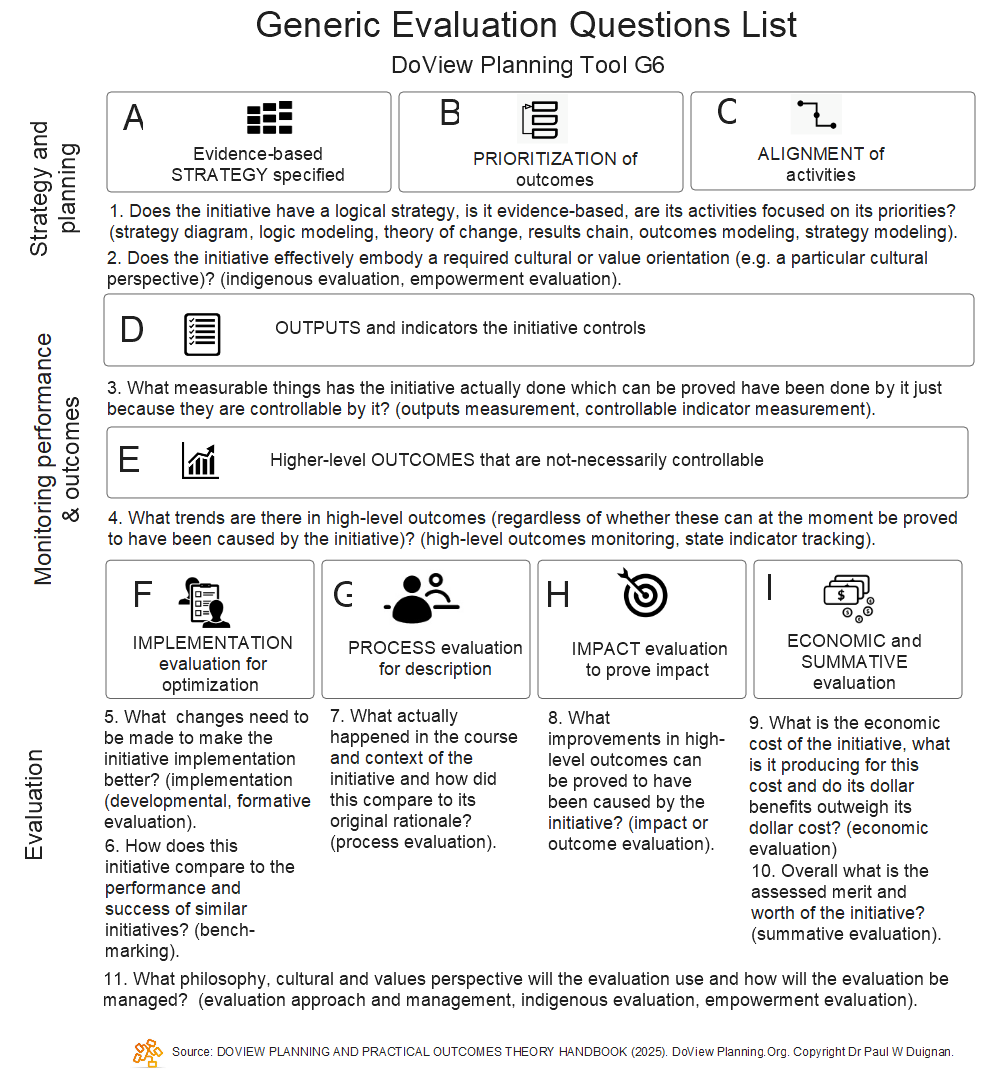
Another aspect of the overall system of performance reporting and evaluation within the Government Planning, Implementation, and Reporting Cycle is having a clear framework for thinking about what government agencies and providers should report back on. The way this is dealt with in DoView Planning is by using the DoView Planning Framework (Tool D1). The DoView Planning Framework sets out the nine components that you need to take into account when thinking about planning, implementation and reporting in any context, including that of government. It is shown in the diagram below. You use it to clarify exactly the information that is required from a department or provider. For large government departments, it is likely to be all of the components in the framework. However, within each component, there also needs to be clarity about what exactly needs to be reported on under that particular component. For example, regarding Components D and E, which are concerned with indicators, it may be that some of the higher-level indicators do not need to be collected by a department or provider itself but can be collected by another agency, for instance a government’s department of statistics. To illustrate further how the DoView Planning Framework can be used, Tool G6 below The Generic Evaluation Questions List shows the performance and evaluation information that can be obtained from each of the components in the framework.
Experience using DoView Planning for this step. A government department and a control agency were having a dispute about exactly what the department should report on regarding its performance and achievements. The DoView Planning Framework was used in a high-level meeting between the parties. They were able to use it to clarify exactly what the department should be reporting on by going through each of the components in the framework and discussing the type of information the department needed to supply. What had been a somewhat unstructured and unfruitful discussion prior to the use of the DoView Planning Framework turned into a productive interaction in which the different parties were able to achieve clarity in regard to the department’s reporting.
A better approach to evaluation
DoView Planning provides a comprehensive and innovative framework for thinking about evaluation within government planning, implementation and reporting. The first DoView tool that can be used in this regard is DoView Planning’s Strategic Evaluation Approach (Tool G2). The traditional approach to evaluation planning is to look at an individual initiative and ask the question, ‘How should this initiative be evaluated?’ This is turned on its head in the Strategic Evaluation Approach. In this approach, evaluation funding is pooled into what can be seen as a sector-wide Research and Development fund. A high-level group then looks across the whole sector and identifies key evaluation questions that need to be asked in order to assist with strategic decision-making. Only those initiatives where evaluation could help answer these key strategic questions are evaluated. Of course, those initiatives still collect performance management information. Other evaluation-related DoView Planning Tools are ones that highlight that evaluation consists of more than just impact evaluation. Other tools provide a set of types of impact evaluation, provide guidance on when impact evaluation should be done, provide a framework for economic evaluation etc. These can all be found in section G in the DoView Handbook.

Conclusion
This page has set out how DoView strategy/outcomes diagrams and DoView Planning can be used in various ways in all of the ten steps in the Government Planning, Implementation and Reporting Cycle. In some cases, DoView diagrams are central to a step in the cycle. In other cases, they complement other work that is being done in order to complete that step in the cycle.
For a whole government to implement DoView Planning requires a lot of work. However, the fact that aspects of DoView Planning have been used in ways similar to how they would be used in a fully implemented Whole-of-Government DoView Planning approach supports the use of the methodology. Any government is free to use any aspect of the methodology outlined above as long as they acknowledge that they are using DoView Planning and describe the diagrams being produced as DoViews. They can also use the AI DoView Drawing Prompt and the free DoView app to provide proof of concept for piloting the use of DoView Planning for Government approach in their setting. They are also free to incorporate any features from the DoView legacy app into their systems, again just as long as they acknowledge its use. However, if you want any assistance in implementing DoView Planning for Government, get in touch.